
Move Stock Between Car Wash Sites: What's New, November 3
Your sites can now send stock to each other, plus clearer To-Do tabs, the whole schedule on your phone, survey reminders, and time off managers can add.
Send stock between your sites
When one site runs low on something another site has plenty of, you don't need to order more. Ask the other site for it in Orders. Select New, then From another site, and pick from what they have on the shelf.
Available on Web

The other site gets a notice and can send all of it, part of it, or say no. Whatever they send moves onto your shelf, and the Transfer log keeps a record of every move in and out.
In Reports, Spending by site counts a transfer at the site that received it, so you can see what each site actually used.
Clearer To-Do tabs
Opening, Midshift and Closing now each have their own tab in To-Do. Each tab shows how many tasks are left and gets a check when that part of the day is done, so your crew can see where they stand without scrolling one long list.
Available on Web · iPhone app 7.8

Choose who gets a notification or an email when a list or a section is finished. You'll know closing is done without calling the site.
The whole schedule on your phone
On a phone, the weekly schedule now fits on the screen. No more swiping sideways to find a day. You read the week from top to bottom.
Available on Web · iPhone app 7.8
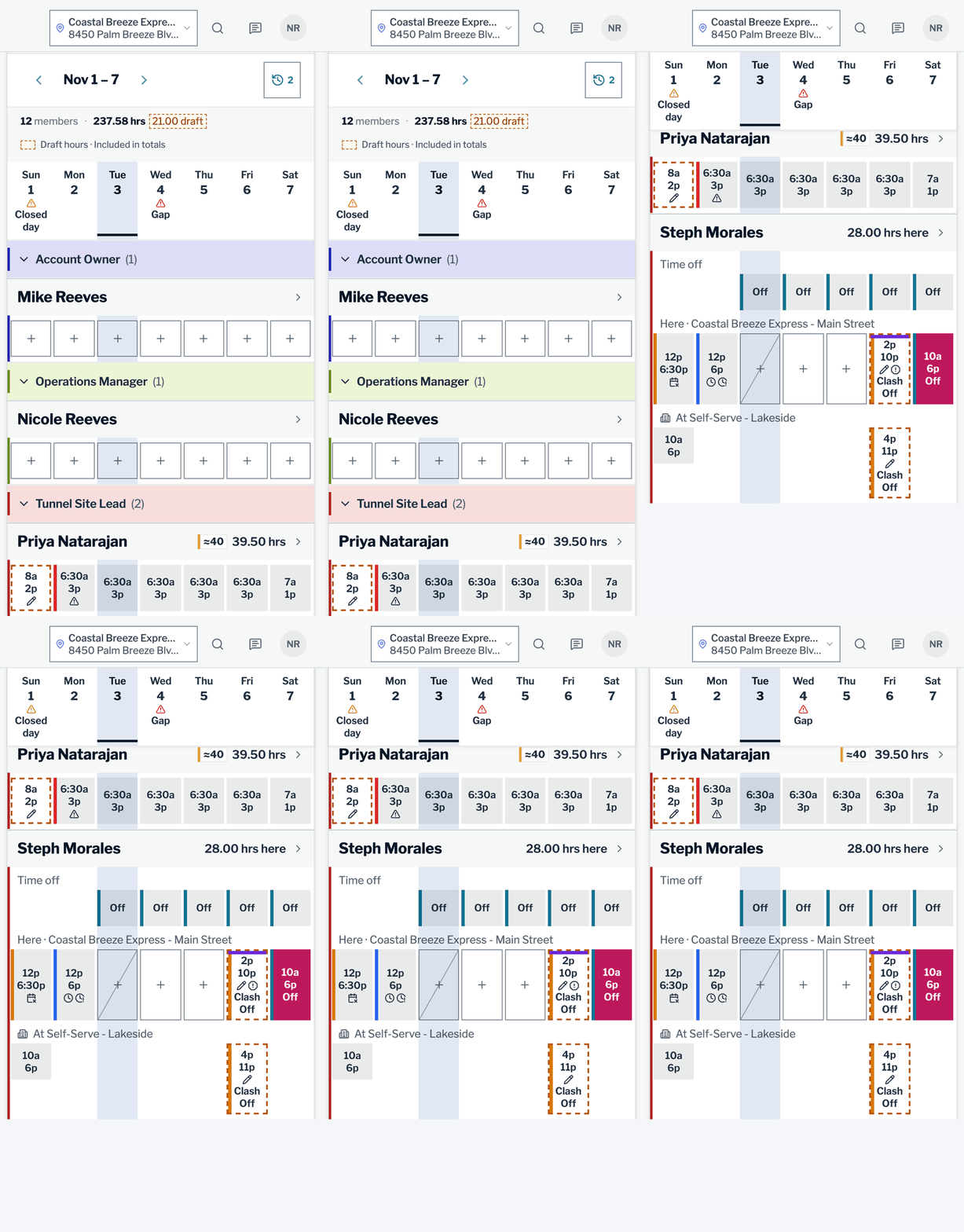
If someone also works at another one of your sites, you see those days too. Shifts that overlap are marked Clash, which makes a double-booked person easy to catch before the week starts.
Survey reminders
Not everyone answers a crew survey the first time. Now you can remind just the people who haven't answered yet, up to three times. You never see who was reminded, and answers stay anonymous.
Available on Web now · iPhone app in its next update

You can also print a QR poster for the break room or share it. Your crew scans it with their phone and answers right there.
Survey settings now fit on one line each. Once enough people have answered, Close and see results closes the survey and opens the report.
Available on Web · iPhone app 7.8
More changes
To-Do
- Every open task now has its own Report button. Say what's wrong, add a photo if you want, and it goes in as a work order.Available on Web now · iPhone app in its next update
- Every list in Open a list now has an assign button, even one nobody has opened today, like a rainy-day list. The assign window also says who can see the list.Available on Web · iPhone app 7.8
- Each list now has Tasks and Settings tabs. Under If it's late, choose a notification, an email, both or nothing, and who gets it.Available on Web
- When you reopen a task someone else finished, the app asks why. If it wasn't done right, they're told it was sent back, and People Review counts it.Available on Web · iPhone app 7.8
- A task's reference photo, showing what done looks like, is now always shown to the worker. Tasks with an AI photo check need one.Available on Web · iPhone app 7.8
- Work an AI photo check flags stays on a Follow-ups list until it's fixed, and each site gets a morning email of what's still open.Available on Web · iPhone app 7.8
- Owners can now turn on Camera only for To-Do and inspection photos, one site at a time. On a phone or tablet, the photo has to be taken right then, not picked from ones taken earlier.Available on Web · iPhone app 7.8
Inspections
- Skipped inspections now show up first, with a count like "9 missed in a row," so the ones being skipped stand out.Available on Web now · iPhone app in its next update
- You can limit an inspection to one or more job titles, like Prep. Associates, employees and technicians need one of those titles to see and do it; site leads, managers and owners always can.Available on Web · iPhone app 7.8
- A custom inspection schedule, like every 2 weeks, now starts on the day you pick.Available on Web · iPhone app 7.8
- Editing an inspection now starts with Items and Settings tabs. On a wide screen, the item list stays beside the item you're changing; on a phone, the item opens on its own screen.Available on Web now · iPhone app in its next update
Equipment, work orders and chemicals
- On the equipment calendar, tap a PM to open its work order.Available on Web · iPhone app 7.8
- Adding a PM is one step: set its next due date and who it goes to by default. You can also pause a PM and resume it later.Available on Web · iPhone app 7.8
- A new Manuals button lists every manual at your site in one place.Available on Web
- Starting a work order on the iPhone now takes four short steps: what's wrong, photos and videos, where it is, and more details.Available on iPhone app 7.8
- In the SDS Library, a tank keeps one sheet in use. Adding a newer one archives the old one, and Restore swaps them back.Available on Web · iPhone app 7.8
Training
- Two sets of ready-made courses are in the training catalog: four Express Wash 101 courses and six from Synergy Solutions. Add them from Courses, then Add from catalog.Available on Web · iPhone app 7.8
- When you add a course to a curriculum, the app asks whether to give it to everyone already in that curriculum. Each course also shows how many people have it.Available on Web · iPhone app 7.8
- Lesson videos can have captions, a transcript and written steps for what's on screen, and audio lessons can have a transcript. Reading the transcript counts as finishing a must-watch or must-listen lesson.Available on Web · iPhone app 7.8
- A course can now have a closed-book knowledge test. While someone owes it, the course's lessons stay locked.Available on Web · iPhone app 7.8
Schedule and kiosk
- On the schedule, the hours and days now stay at the top while you scroll through your team.Available on Web
- Shifts can show their template's color, and the Key says what each color means.Available on Web · iPhone app 7.8
- On a kiosk, the camera now opens faster when someone clocks in.Available on Web · iPad app 7.8
- A kiosk nobody is using goes back to its starting list, and it asks before resetting.Available on Web now · iPad app in its next update
Chat, reviews and Assignments
- In chat, share a site's weather from the + menu. You can also turn on automatic weather alerts for each site, like rain coming, freezing or high wind, with quiet hours.Available on Web · iPhone app 7.8
- A chat message you started typing is still there after you close the page or the app.Available on Web · iPhone app 7.8
- When a review mentions a name the app can't match, it asks who that is and now suggests the people who were working that day.Available on Web · iPhone app 7.8
- Assignments now puts urgent work at the top under Needs you now, and you can switch sites right there.Available on Web · iPhone app 7.8
People Review and Spanish
- Each person's employee record now shows their warnings, the next step, and the good work you've recognized. You can also filter your team by warning step.Available on Web · iPhone app 7.8
- The iPhone app's everyday screens are now available in Spanish.Available on iPhone app 7.8
Lights and complaints
- Every account can now run ABC Wash Systems lights from the Sensors page. You can also pair lights, like the panels of one arch, so a single change reaches all of them.Available on Web in Chrome or Edge · iPhone app 7.8
- Complaints now show the car on every row, put photos on the Evidence line, and have a Needs a decision view.Available on Web now · iPhone app in its next update
- Your logo can now go on the complaint QR code, and one code can cover all your sites.Available on Web · iPhone app 7.8
New in the Time Clock
When someone asks you for a day off in person, you can now add it for them in the Time Clock, so they don't have to send a request themselves. It's approved right away and shows in their Time off history.
Available on Web now · iPhone app in its next update

- Owners can add a missing shift for someone who has left, and can let managers do the same.Available on Web · iPhone app 7.8
- Needs Review now puts what needs your answer at the top, sorts the rest by pay period, and gives each row one clear action.Available on Web
- Under Export on the Hours tab, the new Punch report (PDF) lists every clock-in and clock-out with its photo, person by person, ready to print.Available on Web
Questions or ideas? Email contact@washconsole.com.