Copy Car Wash Checklists to Every Site What's New, October 14
Copy checklists to every site, spot missed work by day, use monthly review totals for bonuses, scan VINs, and get more from WashConsole LEARN.
WashConsole Team/October 14, 2026/7 min read
If you run more than one car wash, you can now copy a checklist, an inspection or a single task to your other sites in a few taps. To-Do also has a new day view with a calendar of missed work. Google Reviews adds monthly totals for paying review bonuses, chemical deliveries can be received by the case, and a complaint can read a VIN straight from the door sticker.
OpsConsole
To-Do
Lists, tasks and inspections now copy to your other sites from the place you edit them, and the To-Do page has a new day view.
Copy a checklist to your other sites, then see where every list lives.
Copy work to your other sites. Open a list and select Copy to other sites. Opening, Midshift and Closing tasks copy from Copy tasks to sites in Edit tasks, and an inspection copies from its menu. Before anything is saved, each site says what it will get, like "Adds 3 · already has 11". A copy only adds what a site is missing. This works on the web and in version 7.1 of the iPhone app.
Add one task at several sites. When you add a task, choose which sites get it, and each site gets its own copy.
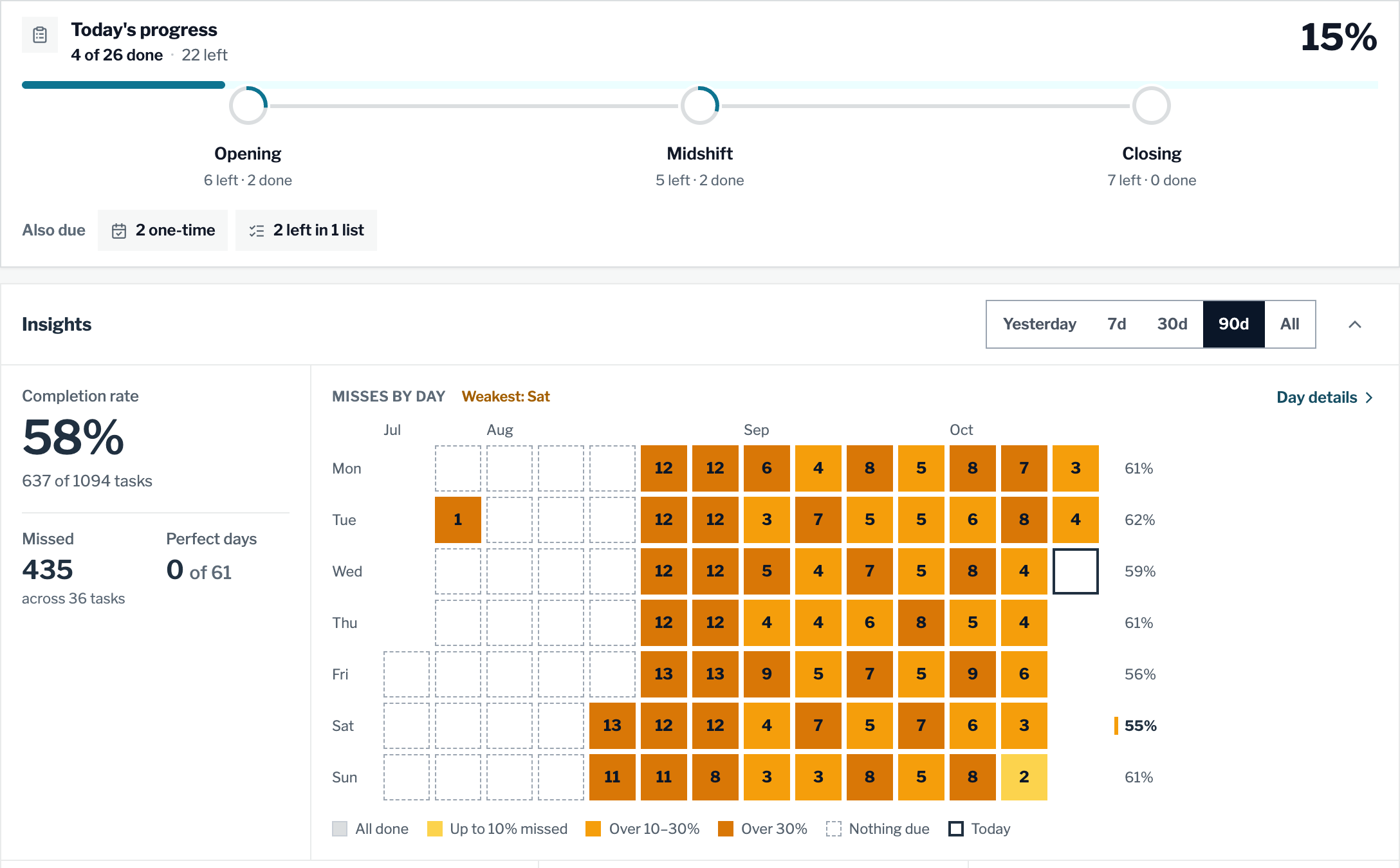
See the day at a glance. The Today card shows how much is done and what's left. Select Opening, Midshift or Closing to jump to that work. To do and Done sit side by side on a wide screen, and every custom list gets its own row. This is on the web and in version 7.1 of the iPhone app.
Spot the days work gets missed. In Insights, the 90-day view is now a calendar called Misses by day. Each day is shaded by how much was missed, and Day details opens any single day. This is on the web now and coming to the iPhone app in its next update.
Google Reviews has a new Totals tab for paying review bonuses.
Credit a review from the monthly totals and the count updates.
Monthly totals by teammate. Totals lists each teammate's five-star reviews for any month at the site you're on. Select a total to see the reviews it includes. If a review names someone but isn't credited yet, you can credit it right there. Download CSV saves the month for payroll.
Pick the period on Competition. The Competition tab can now show today, the current period, the last period or all time. A monthly competition shows This Month and Last Month, and a weekly one shows weeks. The last period still lists people who have since left, so you can pay out a finished period in full. Totals and Competition both work on the web and in version 7.1 of the iPhone app.
Each tank now has its own auto-order switch, and deliveries are received by the case.
Receive a delivery by the case, straight into the tank or into storage.
Choose which tanks order on their own. Each tank has an Order automatically when low switch in its settings. When it's on, a supply order is created in Orders when the tank reaches its Low level. Turn it off and the tank still shows Low, but nothing is ordered.
Receive deliveries by the case. An open order shows on the tank as an On order card. Select Receive it, enter how many cases arrived, and choose Add to storage or Poured into the tank. WashConsole adds the delivery to the level you chose and closes the order. This works on the web and in version 7.1 of the iPhone app.
A simpler SDS Library. Each safety data sheet is one row with an Open SDS button. Managers see a Missing a sheet list for chemicals that don't have one yet, and Replace SDS PDF swaps in a newer sheet. This is on the web now and coming to the iPhone app in its next update.
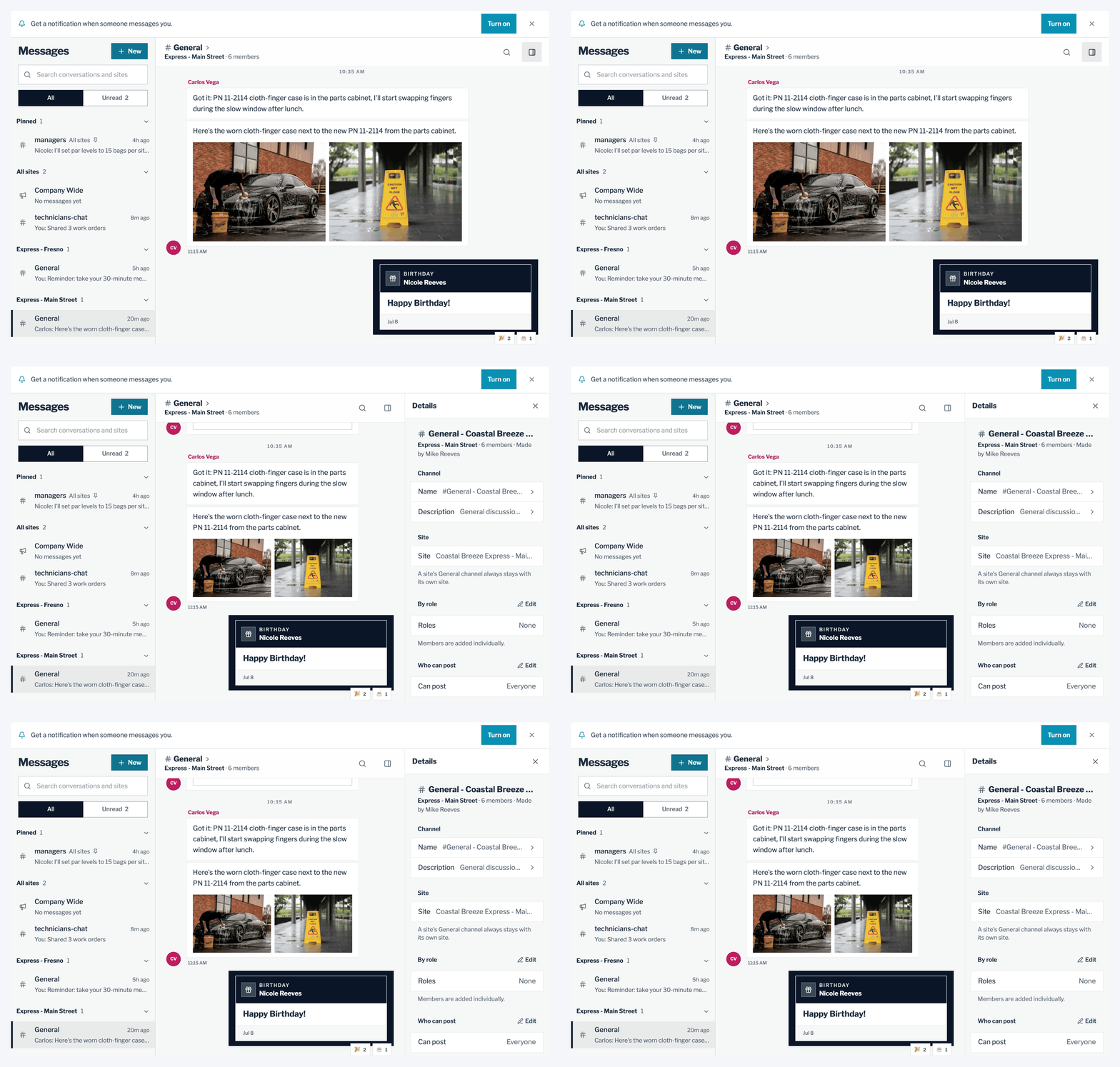
Find the right conversation faster. The list starts with All sites, then each of your sites, then Direct messages. Site conversations show their site in the list, the header and search.
One Details panel. Open Details to see the conversation's name and members, plus shared items and starred messages. Site channels also show their site. The grouping and the Details panel are on the web now and coming to the iPhone app in its next update.
Get chat alerts in your browser. Select Turn on in Chat, or in Settings under Notifications, to get alerts in a supported web browser. On an iPhone or iPad, add WashConsole to your Home Screen first. Learn more about team chat.
TeamConsole
Kiosk
Tablets, PINs and Kiosk Mode now share one page, and someone who gets locked out can sign in again with the same PIN.
One page for tablets, PINs and sites. The Kiosk page lists each tablet with who's signed in and when it last checked in, every person's PIN with one button, and Kiosk Mode for each site. Turning a site off asks you first.
Unlock without a new PIN. After too many wrong PINs, select Unlock next to the person's name. They can sign in again with the same PIN once the tablet updates, usually within a minute. On the tablet, a locked name now says how to get back in.
Ready for the next person. After someone signs out at the tablet, the name list is ready for the next person, and a wrong PIN shakes the dots so it's easy to notice.
A complaint can now read a VIN from the barcode on the door sticker.
Scan the barcode instead of typing 17 characters.
Scan a VIN. Select Scan VIN next to the VIN box on New complaint, Edit complaint or a case's vehicle details. Point the camera at the barcode on the door sticker, or use a photo. Check the car it found, then Use this VIN fills in the VIN, plus the model and year if they're empty. This is on the web now and coming to the iPhone app in its next update.
Short case numbers. New complaints get short numbers like C-1001, which are easy to read out to a customer. Complaints you already have keep their numbers.
Choose camera footage more easily. When you pick cameras for a complaint or an inspection, the cameras you chose show at the top, sites with many cameras get a search box, and the still viewer steps between camera angles.
The web app has a new look, plus smaller changes to Portfolio, the Schedule grid and surveys.
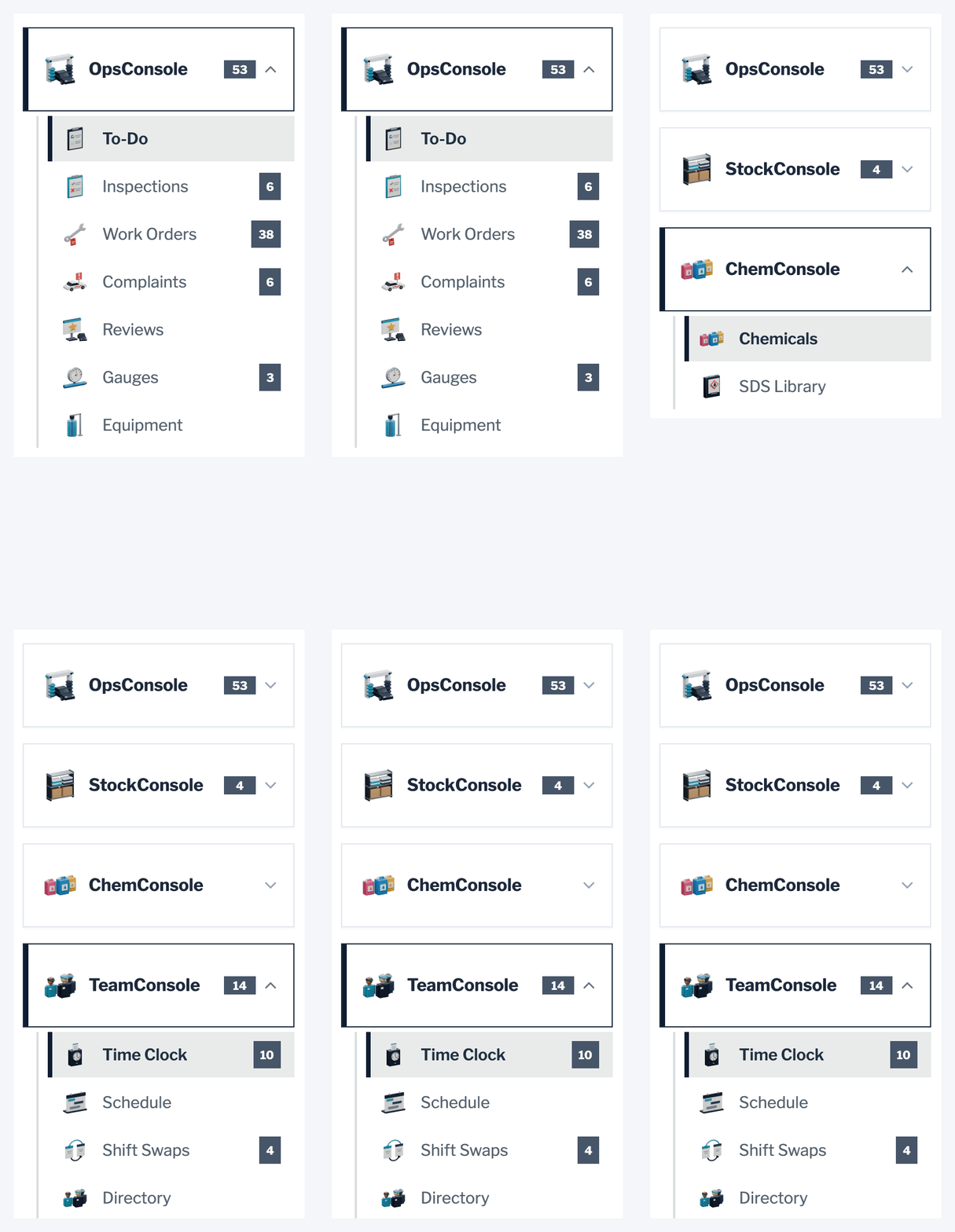
Every page has its own picture in the menu.
A new look. The web app has a new typeface and square corners, and every page has its own car wash picture in the menu and at the top of the page.
Portfolio is a quick site picker. If you run more than one site, the first page lists each site on one row with its short name, status, city and weather, and the map sits beside the list. This is on the web now and coming to the iPhone app in its next update.
See availability on the schedule. The Schedule grid shades the hours each person isn't available, so you can see when they can work before you add a shift. Learn more about car wash employee scheduling.
Better survey questions. Survey questions can now be required, moved up or down, and labeled at each end of a scale. Here's how crew surveys work.
Spotlight: WashConsole LEARN
WashConsole LEARN trains your crew on your own procedures and shows who has finished what. It was redesigned this month, and certificates for courses you create now carry your car wash's logo and colors when you've set them.
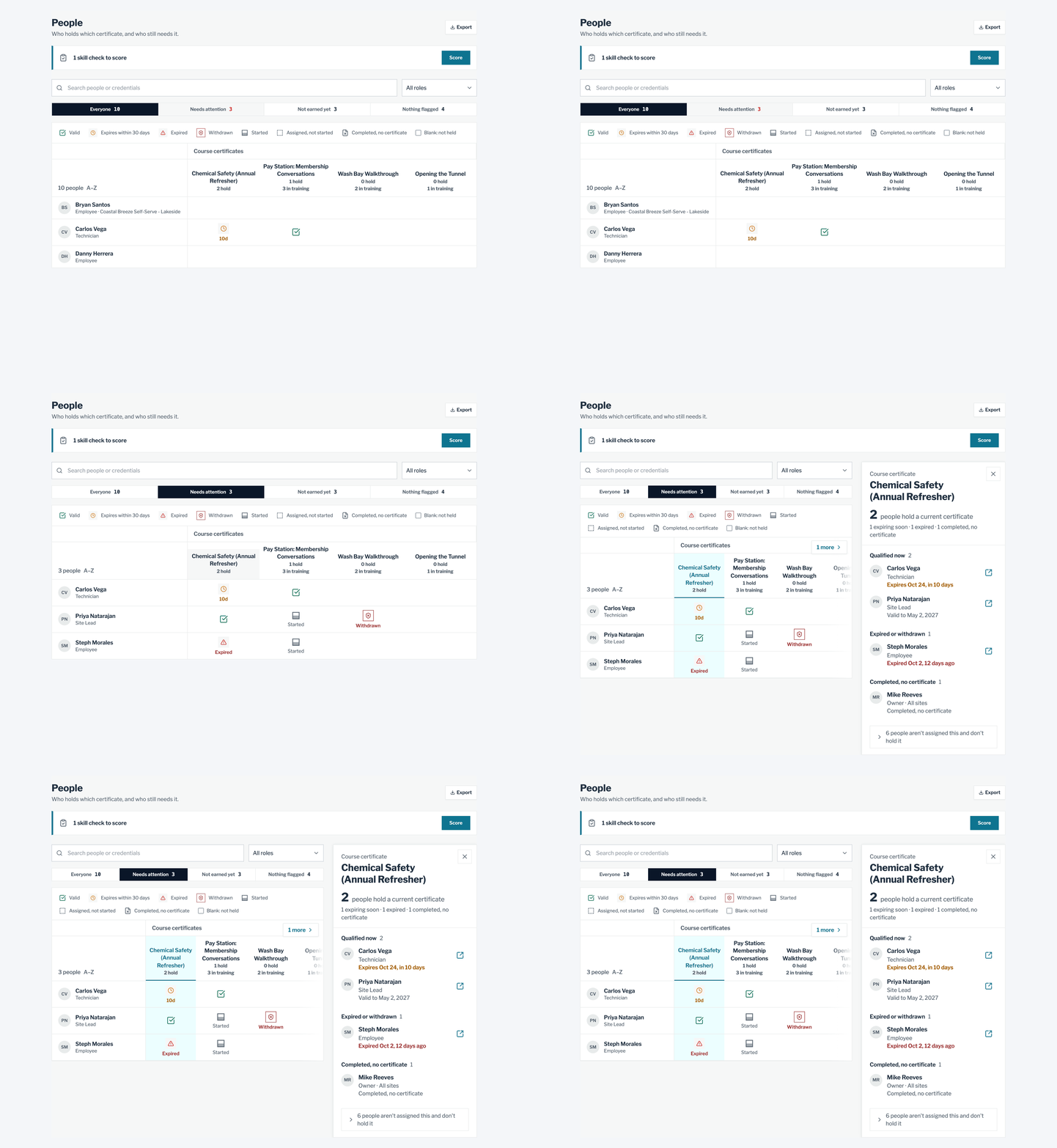
See who's qualified, and who needs a refresher, at a glance.
See who's qualified. In Learn's Manage area, the People tab shows every person against every course certificate. Needs attention narrows it to expiring, expired or withdrawn certificates, and selecting a course lists who holds it.
A focused course reader. A course now opens full screen, with its outline a tap away. My Training starts with Up next, the one course each person should take next.
Onboarding paths for new hires. Put courses in order with due dates, and a new hire sees them as numbered steps in My Training. A finished path folds away so current training stays in view. Learn more about onboarding paths.
Ready-made courses. Add from catalog, on the Courses tab, has courses you can use as they are. Preview shows a course the way your crew will see it before you add it.
Questions or ideas? Email contact@washconsole.com.