
Turn Google Reviews Into a Team Sport With Our New Competition Feature
Use employee mentions, leaderboards, and review trends to recognize your team's service and keep track of customer feedback.

Recognize the Service Behind Each Review
Customer reviews can highlight helpful service from individual employees. Google Reviews Competition brings those employee mentions into a leaderboard, giving managers a way to recognize the team members customers mention.
Use the standings alongside the reviews themselves. A mention count is a starting point for a conversation about service, not a complete measure of an employee's work.
Why This Matters
Google Reviews give prospective customers a way to read about other customers' experiences. For your team, they can also reveal what customers appreciate and what needs attention.
A shared leaderboard makes recorded mentions easier to discuss at a shift meeting. Read the feedback behind the rankings, recognize helpful service, and address recurring concerns.
The screenshots illustrate the interface. Their values are not a published customer-results study.
How It Works
Employee Leaderboard
The Competition tab ranks active team members using the employee mentions assigned to reviews in WashConsole. Rankings update as review data is synced or imported and mentions are matched. Managers can review those matches to check that an employee receives the right credit.
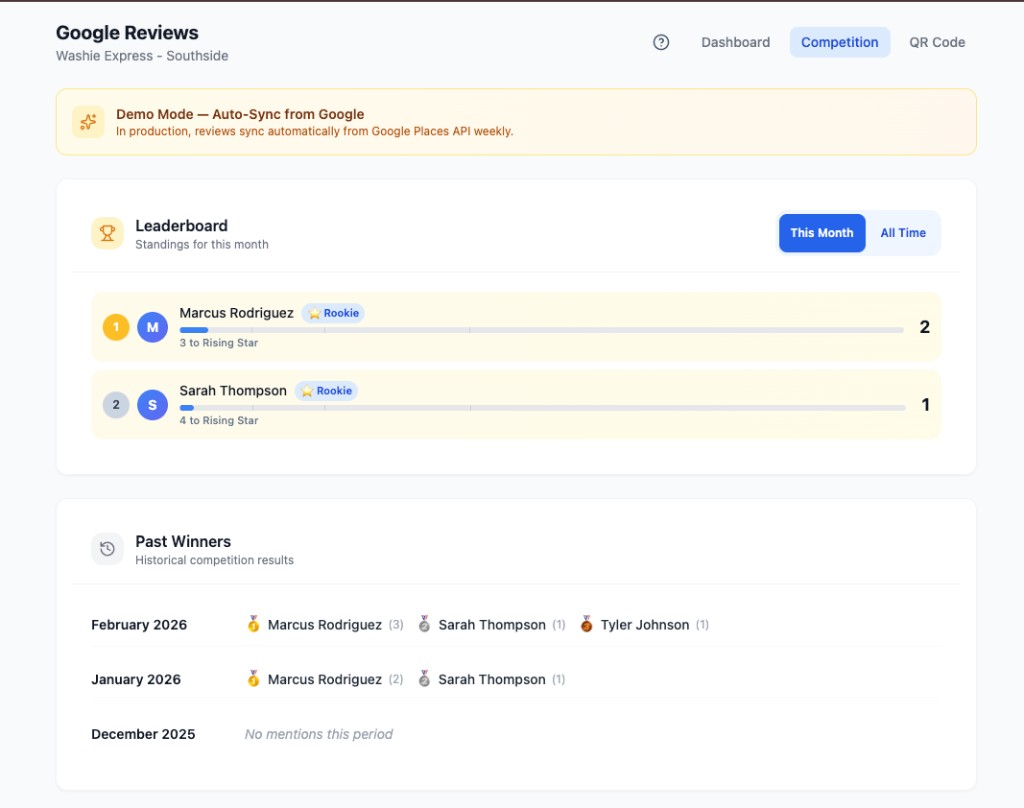
Employees earn rank badges as their recorded mentions reach the configured levels. The default names are:
- Rookie: Just getting started
- Rising Star: Building momentum
- All-Star: Continuing to earn mentions
- MVP: Reaching the next recognition level
- Legend: Hall of fame status
Badge levels give the team milestones to follow alongside the current competition standings.
Dashboard with Goal Tracking
The Dashboard tab gives managers a bird's-eye view of review performance: current rating, total reviews, weekly volume, and a configurable star-rating goal with a clear count of how many five-star reviews are needed to reach it.
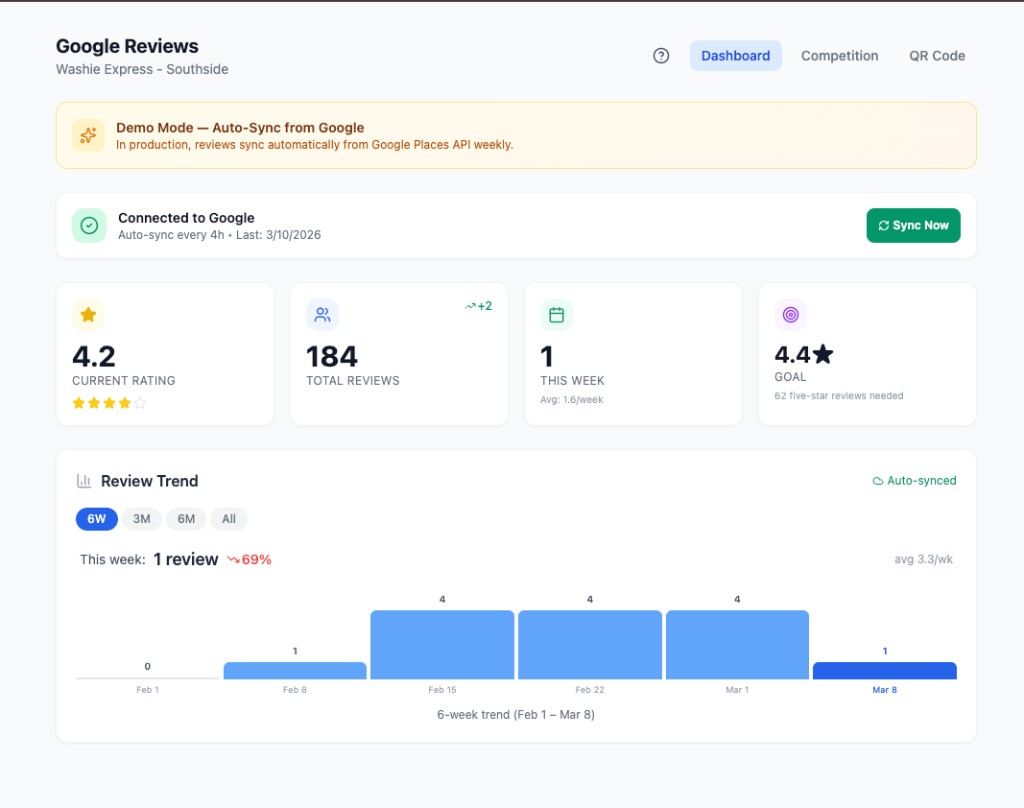
The Review Trend chart lets you compare recorded review volume across time windows. Check the last-sync information and imported history before interpreting a change in the chart.
Competition Periods & Past Results
The competition uses a configurable reset period, with monthly as the default. The Past Winners section shows results for completed periods based on the recorded employee mentions, so managers can revisit recent standings with the team.
QR Code for Customers
Need to make it easy for customers to leave a review? The QR Code tab generates a ready-to-print code that links directly to your Google Reviews page. Place it at the register, on receipts, or at the exit tunnel and let customers scan and review in seconds.
Setting Up Google Reviews in WashConsole
Link your location's Google listing in WashConsole, then import available review history and configure ongoing sync. The Google Reviews guide explains the location setup. Here is how to import a Google Takeout export:
Step 1: Export Your Google Business Profile Data
- Go to Google Takeout
- Click Deselect all to start clean
- Scroll down and check Google Business Profile
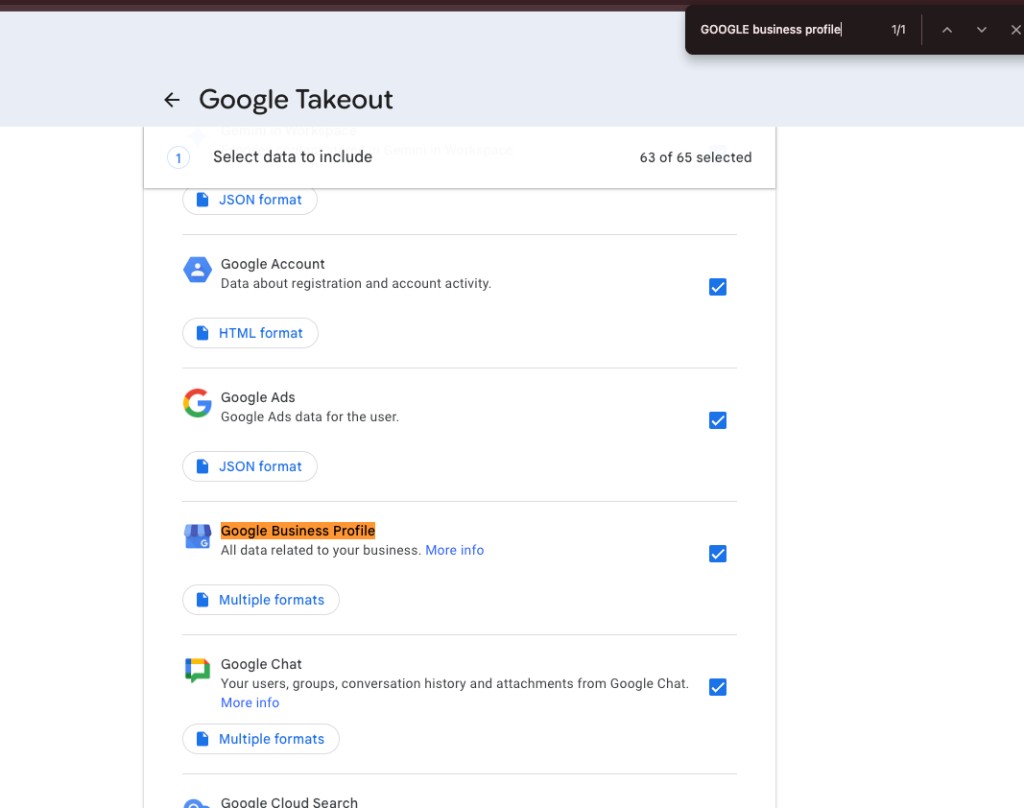
- Click Next step at the bottom
- Choose your delivery method (email download link is easiest)
- Click Create export
Google will process your request and email you when the export is ready.
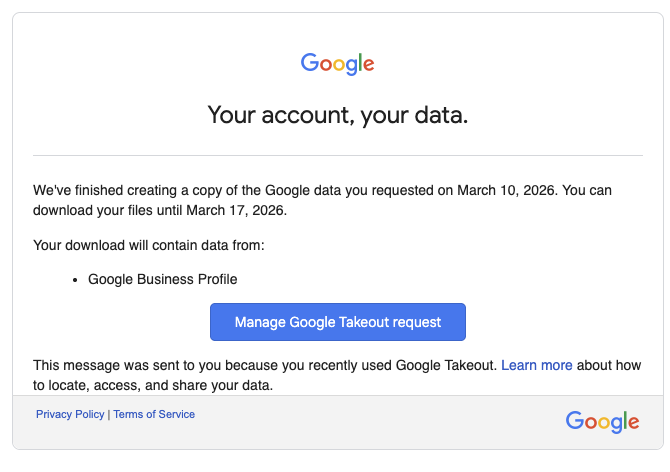
Step 2: Download and Upload to WashConsole
- Open the email from Google and click Manage your Takeout request
- Download the ZIP file
- In WashConsole, go to Google Reviews and follow the import prompts
Step 3: Enable Auto-Sync
Review the auto-sync setting and interval for your location. WashConsole checks enabled locations on a schedule and syncs them when their configured interval is due; the default interval is 12 hours. Check the last-sync time to see when the location was refreshed.
The Google Places review feed is limited and may not supply your full review history. Use the review import guide when you need to bring in historical reviews.
Measure What Changes at Your Location
Use the Review Trend chart to compare periods of the same length, then read the underlying feedback and employee mentions. Record when you changed your team's review process so you have context for later comparisons.
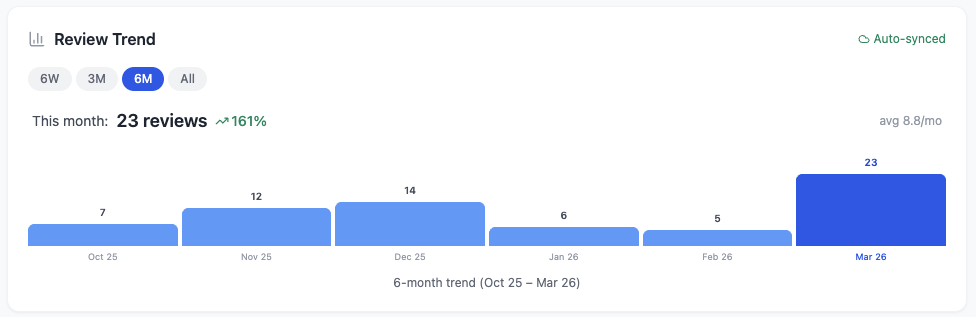
Interface example; values are not a published customer-results study.
- Compare like periods. Keep the date range consistent and note changes in wash volume, opening hours, and seasonal demand.
- Check the data coverage. A new import or a gap in sync can change the recorded totals without reflecting a change in customer behavior.
- Read beyond the count. Look for recurring service praise and complaints, and use those details in coaching conversations.
Available Now
Google Reviews Competition is live for all WashConsole subscribers. Navigate to Google Reviews in your dashboard and click the Competition tab to get started.
Review Competition is included in WashConsole, with no separate add-on required.
Questions about setting up Competition? Visit our [Help Center](/knowledge) or chat with our support team.