Back to Blog
Improvement

What's New in WashConsole July 24, 2026

Our biggest update in a while, grouped by area. Sensors are now live for every account. Scheduling got a lot smarter — suggested shifts from last week, dollar bonuses to fill open shifts, availability right in the grid, pre-shift reminder emails, drag-and-drop editing, and a rebuilt employee Time Clock. Daily tasks gained an at-a-glance inspection history, a printable Task Lists report, and lists that react to the weather. And inventory and equipment got tunnel-order chemicals, days-remaining you can finally trust, and full zone history.
WCWashConsole Team/July 24, 2026/8 min read
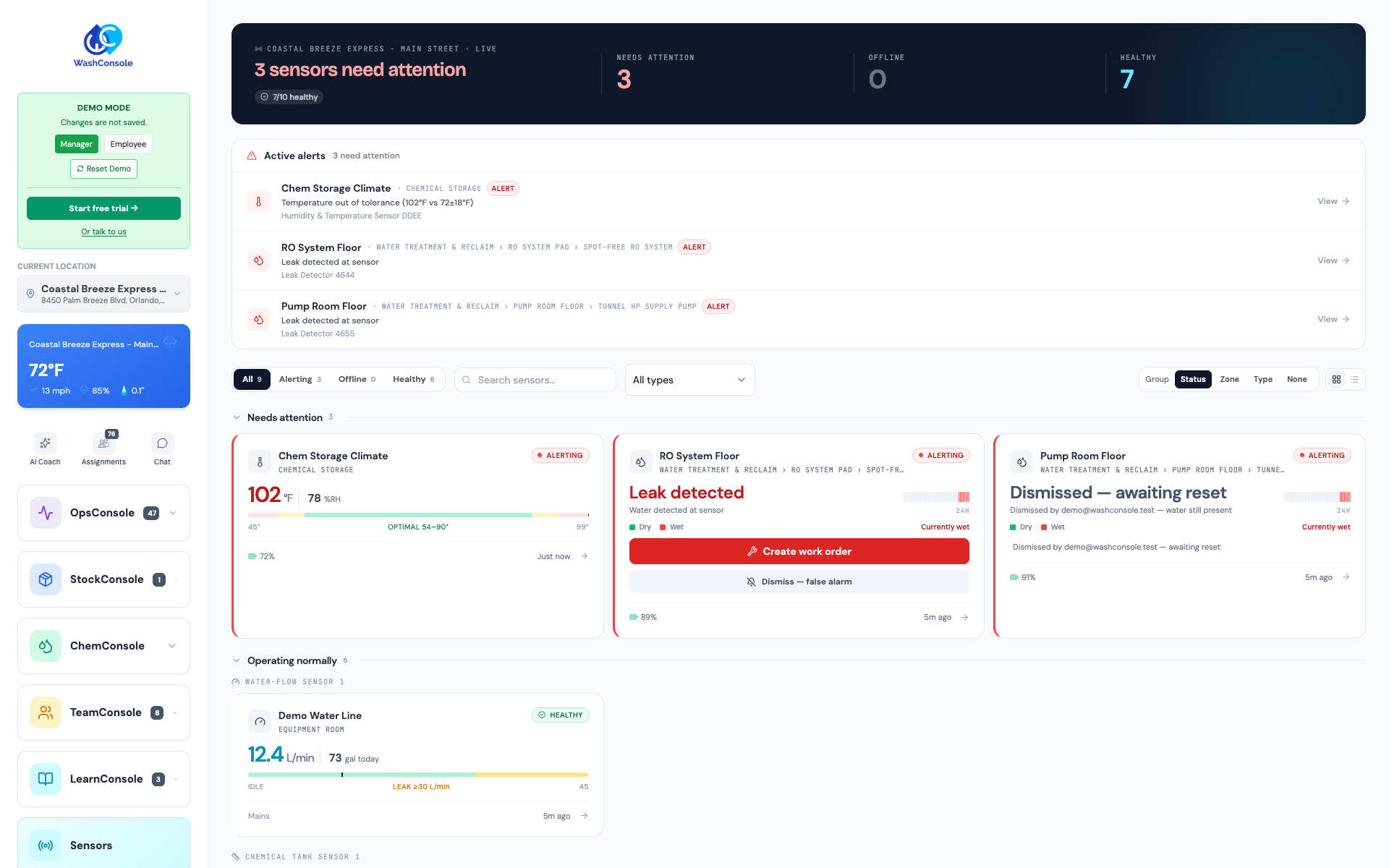
The new Sensors page catching three problems live: a chemical room running hot and two water leaks — with the rest of the site's sensors reporting healthy below.

The Short Version

We packed a lot into the last couple of weeks. To keep it easy to follow, everything new is grouped by the part of WashConsole it touches — Sensors, Scheduling & the Time Clock, Daily Tasks & Inspections, and Inventory & Equipment — with a batch of smaller fixes at the end.

The headline is Sensors: out of beta and on for every account. Your wash is a building full of water, heat, and machinery, and now the same console that runs your team can watch all three. Connect a water-leak sensor, a temperature sensor, or a smart switch, and it shows up live in WashConsole — setup takes a couple of minutes.

On the scheduling side, the schedule got a lot smarter: it suggests this week's shifts from last week's pattern, lets you put a dollar bonus on an open shift, shows who's available right in the grid, and can email each worker before their shift — and the employee Time Clock was rebuilt around three simple tabs.

For daily tasks, there's an at-a-glance inspection history, a printable Task Lists report, and lists that react to the weather. And across inventory and equipment, chemicals and equipment sort into your tunnel's order, days-remaining forecasts finally read true, and every zone shows its full history.

Everything here is live on the web app today. Most of it is on the mobile app too, and the rest — including the iOS app's refreshed bottom navigation — arrives in the next app update.

A few favorites
01
Sensors, for everyone.
Watch leaks, temperature, and equipment live — and adding one takes a couple of minutes.
02
Suggested shifts.
Build next week from last week's pattern in a fraction of the clicks.
03
A bonus on an open shift.
Attach a dollar incentive to a shift that has to get covered.
04
The Time Clock, rebuilt.
Today, Timecard, and Requests — punching first, everything else one tab away.
05
Task lists that watch the weather.
A heat-advisory list when the pump room spikes; a snow-day list when tonight's low drops.

Sensors & Devices

Keeping an eye on the building itself — the water, heat, and machinery behind every wash.

Sensors Are Here — For Every Account

A backed-up floor drain, a pump room creeping past 95°, a compressor that tripped overnight: the expensive problems at a wash usually start quietly. Sensors, until now in beta, is live for every account this week — look for it in your sidebar.

Connect the hardware your wash needs and each device becomes a live tile in one place:

Water-leak sensors that flag standing water the moment it appears, with a running history of events.
Temperature and humidity sensors for pump rooms, equipment rooms, and anywhere heat is the enemy.
Smart switches and relays for the equipment you want to check on — or flip — from anywhere.
Local weather, right next to your hardware, because the day outside drives the day inside.

Adding a sensor is quick: WashConsole spots it on your network, recognizes what it is, and fills in the details — you confirm a name and you're done. A leak sensor is the easiest place to start: grab a Hydrific Droplet at a WashConsole discount, then follow our step-by-step Hydrific Droplet guide to connect it.

(That's the Sensors console at the top of this post.)

Scheduling & the Time Clock

Everything around building the week, filling open shifts, and tracking the hours your team actually works.

Smarter Scheduling: Suggestions, Bonuses, and Reminders

Building a week and getting every shift covered is the part of scheduling that eats the most time. Four upgrades take a big bite out of it:

Suggested shifts from last week. Most weeks look a lot like the last one. WashConsole now reads last week's schedule and offers this week's shifts as ready-to-place suggestions — accept the ones that fit, adjust the rest, dismiss the ones that don't. A full week goes up in a fraction of the clicks. (On the web app to start.)
Put a bonus on an open shift. When a shift has to get covered, add a dollar incentive — say $25 — right on the open shift. Everyone eligible sees the bonus the moment it's posted, it stays attached once someone claims it, and it flows straight into your labor cost and payroll. Only managers can set or change it, and only the person who claims it (and their managers) can see it.
See who's available, right in the grid. Empty schedule cells now show each person's available or preferred hours — say, 12:00–9:00 — in the same green-and-blue colors as the Availability tab, so you can staff around real availability without opening anyone's sheet. (Setting each person's min and max hours per week is now manager-only, too.)
Pre-shift reminder emails. Set a lead time per location — anywhere from 1 to 48 hours — and WashConsole emails each scheduled worker before their shift, with the day, time range, hours, and role. Fewer "I forgot I was on" no-shows. It's off until you switch a location on, so nothing changes until you want it to.
The smarter schedule in one view: a Suggestions button that turns last week's pattern into ready-to-place shifts, a +$15 bonus pinned to an open shift to help it get claimed, and a heads-up flagging the two days with staffing gaps.

Edit the Schedule Right on the Timeline

Daily Coverage — the view that shows how your day is staffed hour by hour — is no longer just for looking. Now you can fix the day right there:

Drag a shift to a new start time and the whole bar moves with it.
Grab either edge to lengthen or shorten the shift.
On a phone or tablet, press and hold to pick a bar up, so scrolling the day never moves a shift by accident.
Shifts that already have time-clock punches show a lock and stay put — the schedule can't drift away from hours someone actually worked.

And on the week grid, there's a matching speed-up: copy and repeat-paste. Build one shift the way you want it — say, 8:00–2:00 with a lunch break — then paste it across the other days and people it fits. WashConsole won't paste over an existing shift or someone's approved time off, and it warns you on days a person prefers not to work.
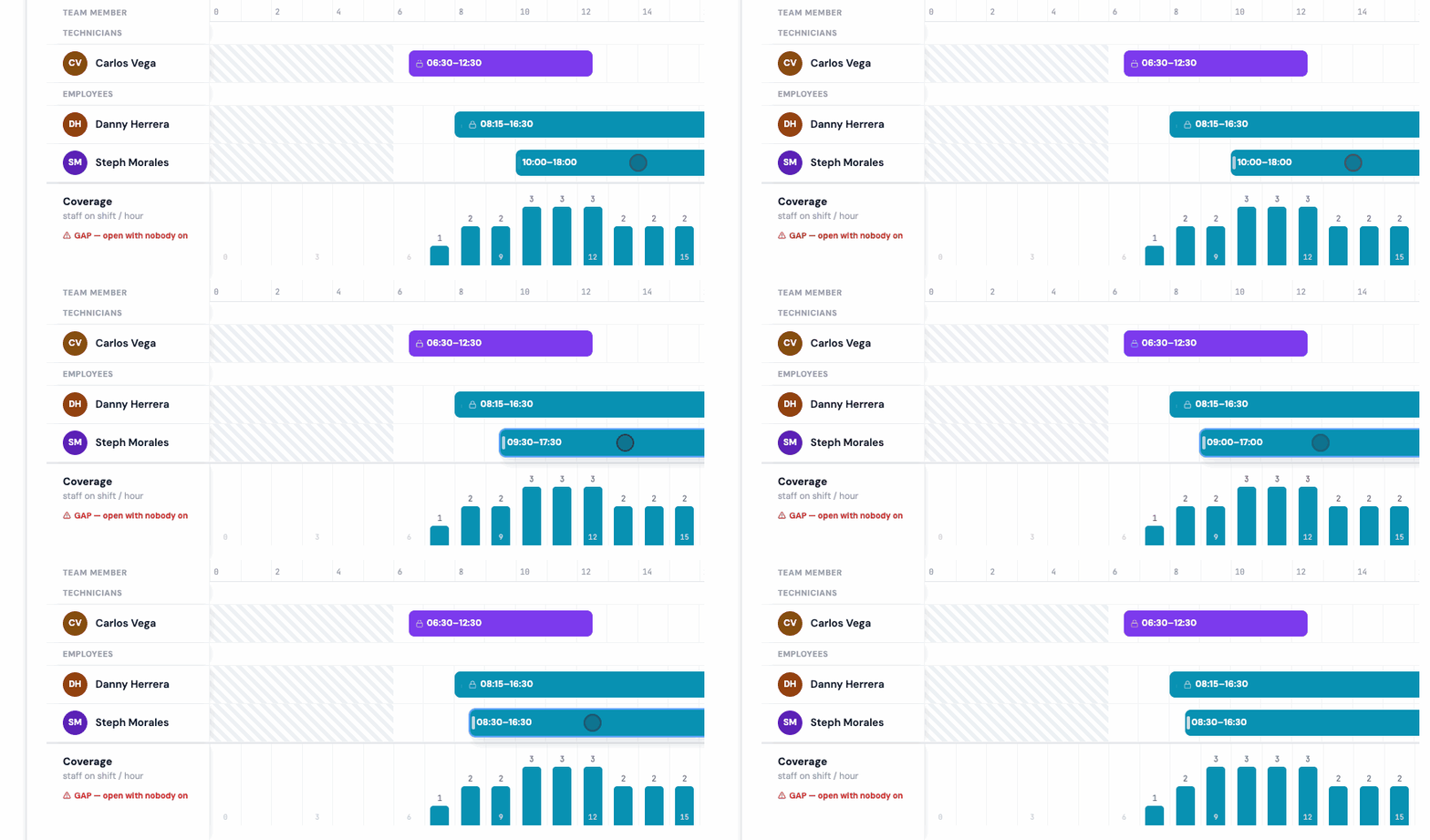
Watch: grab a shift and slide it to a new time — the times update as you drag, and bars with a lock (shifts already worked) stay put.

The Employee Time Clock, Rebuilt

The Time Clock your team sees every day used to be one long page: punching, hours, corrections, time off, swaps, and open shifts all stacked together. It's now organized into three tabs that match how people actually use it:

Today puts punching first — clock in, clock out, breaks — with today's status right there. If a manager returns a time-entry correction to you, it appears here too, so a payroll fix never hides.
Timecard holds your hours, corrections, and history in one compact view, so checking your week takes seconds.
Requests gathers time off, shift swaps, and claimable open shifts into one task-focused place.

It's all easy to use from the phone in your pocket, and your timecard's "today" always follows your wash site's local time, so hours land on the day you actually worked them.
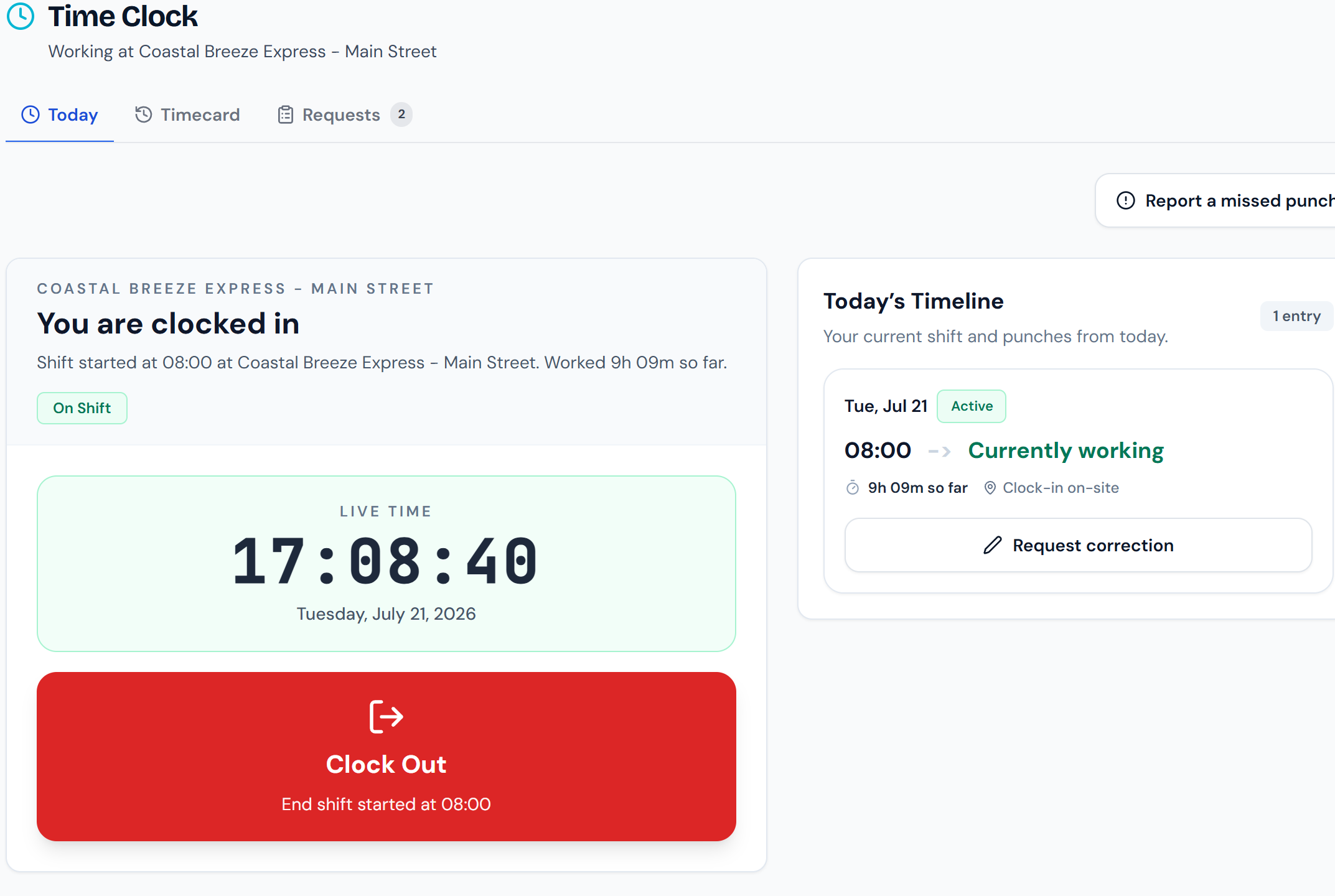
The new Time Clock: today's status front and center — clocked in, live clock, one big Clock Out button — with your timecard and requests one tap away.

Daily Tasks & Inspections

The checklists and checks your team runs every shift — and the records they leave behind.

Let the Weather Trigger the Right Task List

Every wash has a "when it's blazing hot" routine and a "when it's freezing" routine — and they only matter on the days the weather calls for them. Now your custom lists can surface themselves automatically. Set a temperature or forecast trigger on a list, and it appears under Suggested when a connected sensor reads past your threshold or the forecast crosses it:

A Heat Advisory prep list when the pump room sensor hits 102°.
A Snow Day list when tonight's forecast low drops to 28°.

Recommended exactly when they're relevant, and out of the way when they're not — a natural payoff now that Sensors is on for everyone. Web and mobile.

Weather-triggered lists surfacing under Suggested on the To-Do page — a Snow Day list because tonight's forecast low is 28°F, and a Heat Advisory Prep list because the Chem Storage sensor read 102°F — each showing the reason it appeared.

Inspection History You Can Read in One Glance

"Did the opening checks actually happen every day this week?" used to mean opening runs one at a time. Every inspection now has a run-history grid: the checklist's items down the side, the days across the top, and each cell showing how that item did on that run. A pass is a quiet green check; an item that failed and raised a work order is flagged right in its cell. Tap any cell to open the full run, or export the history when someone needs the record.

And it reads just as well on your phone, so checking last night's close from the couch actually works.
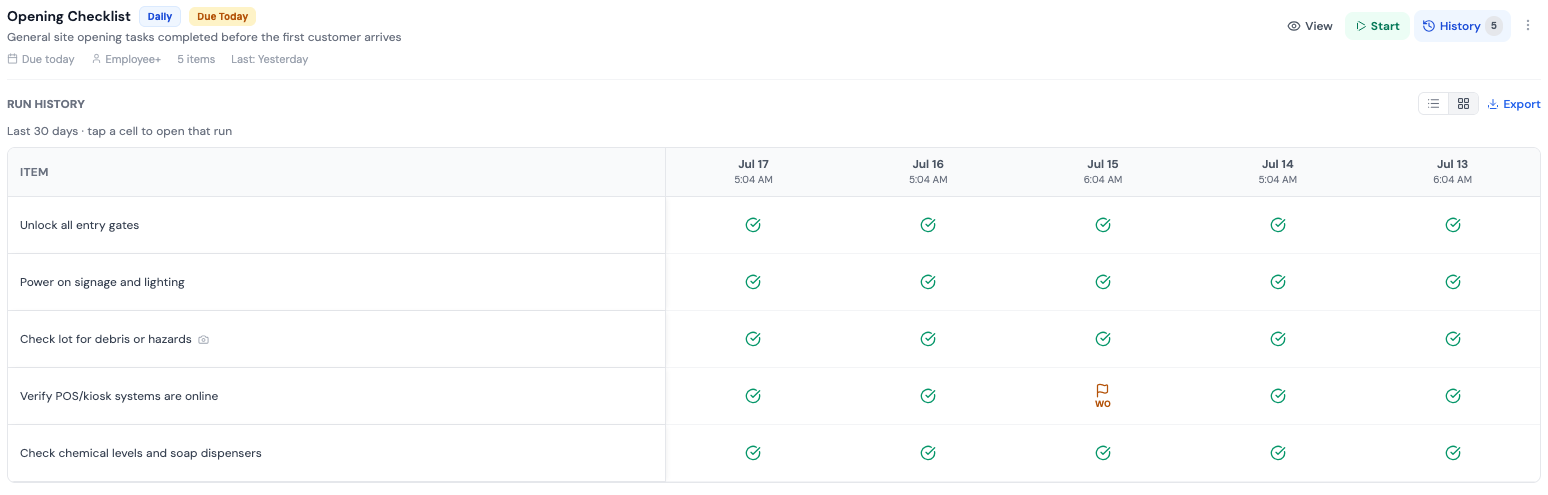
The Opening Checklist's history: every item, every day this week — green checks across the board, and the one item that raised a work order flagged.

Task Lists You Can Print, Save, or Export

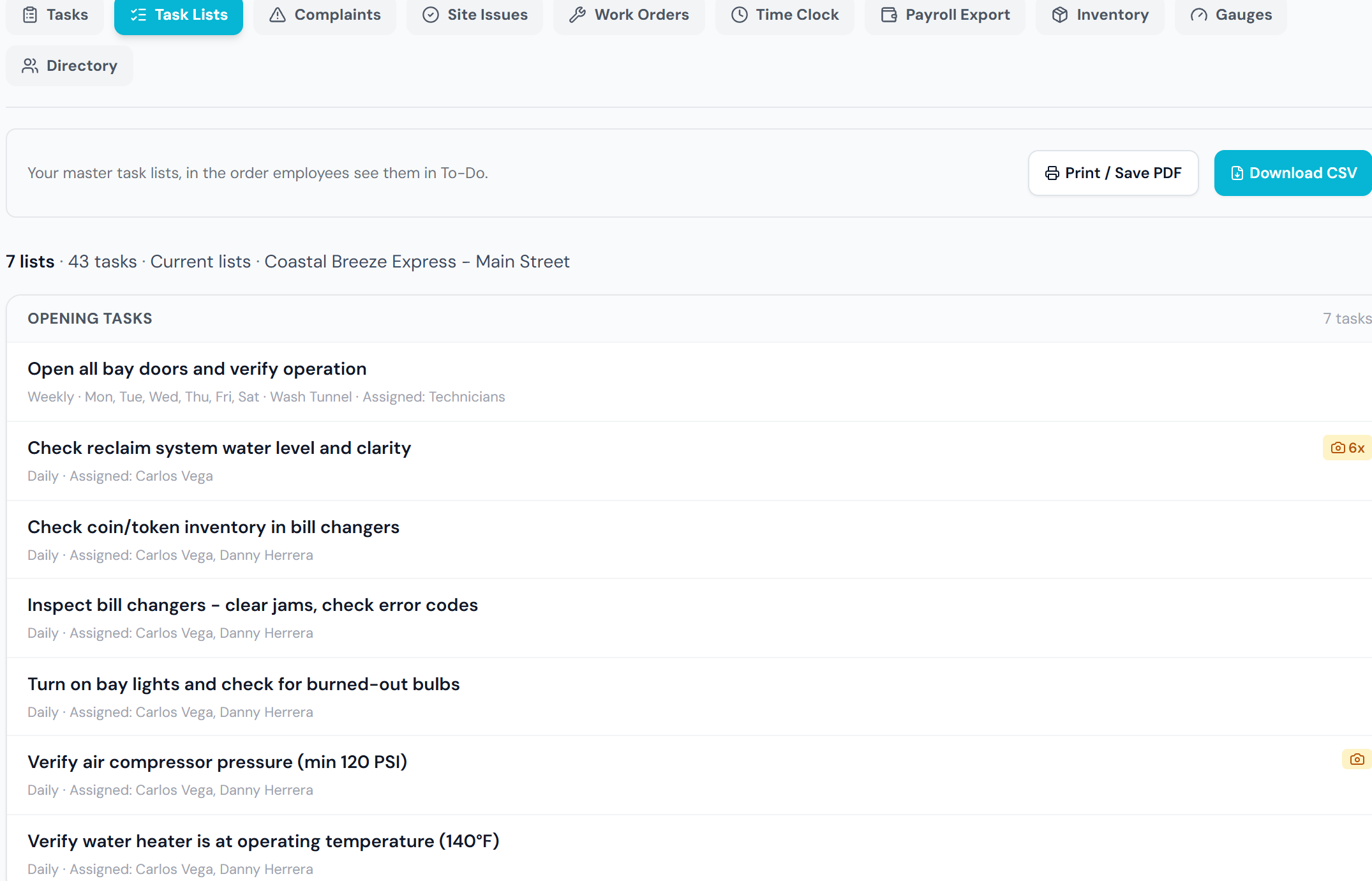
Your Opening, Midshift, and Closing lists — and any custom lists you've built — can now leave the app. The new Task Lists report under Reports turns them into a clean printout, a PDF, or a spreadsheet.

Tape a fresh opening list inside the chemical room door, hand a new hire their first close on paper, or keep a dated record of exactly what each list required — without retyping anything.

The Task Lists report: your Opening, Midshift, and Closing lists with each task's schedule and who it's assigned to — one click to print, save as PDF, or export a spreadsheet.

Inventory & Equipment

Tracking what you use, what it costs, and the machines that use it.

Put Chemicals and Equipment in Your Tunnel's Real Order

Every tunnel has a real order — presoak before wraps, wraps before wax, wax before drying agent. Your chemical tanks, tank groups, and equipment lists can now be dragged into that order, and it sticks everywhere those lists appear, on web and mobile.

It's a small change that pays off every single day: inventory counts, checks, and equipment reviews now flow the same direction someone walks the tunnel, instead of alphabetically or in the order things happened to be added.
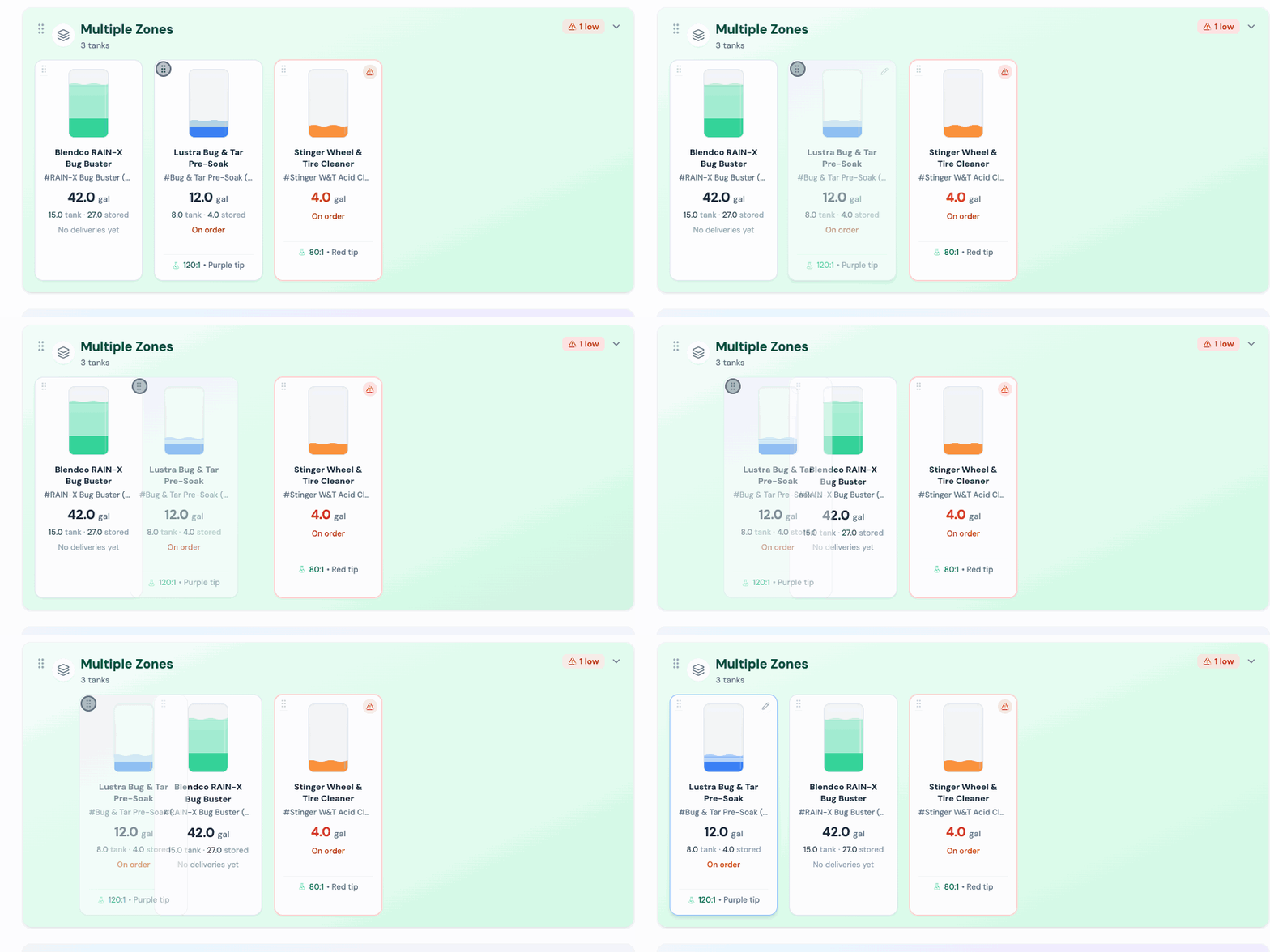
Watch: drag a tank into the spot that matches your tunnel, and that order sticks everywhere your lists appear.

Inventory Days-Remaining You Can Trust

"About 5 days left" only helps if it's right. We rebuilt how WashConsole estimates days-remaining for every inventory item, and fixed the ways it used to mislead you:

It now reads your real usage — ignoring mis-scans that get undone seconds later and one-off bulk pulls that aren't part of your normal usage.
And the big one: the estimate updates the moment stock changes — including right after you receive a shipment. No more a delivery leaving a stale "5 days" sitting on a shelf you just refilled.

One real example: a spare hose that read a confusing "~5 days left" with two on hand now reads a sensible "~24 days." Web and mobile.
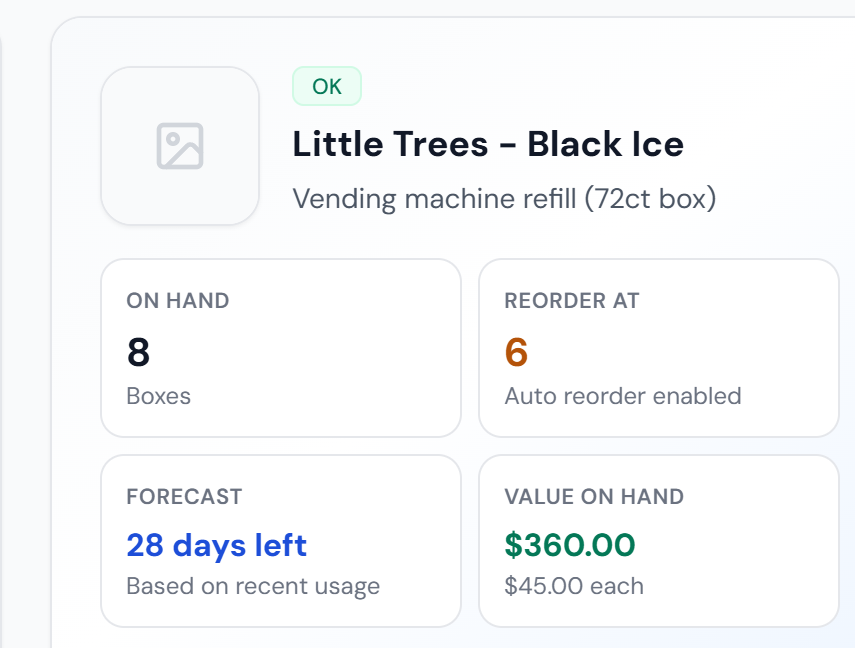
Open any item and its forecast shows days-remaining from your real usage — here, 28 days left on the air-freshener refills, alongside the on-hand count and reorder point.

Every Zone Now Shows Its Full History

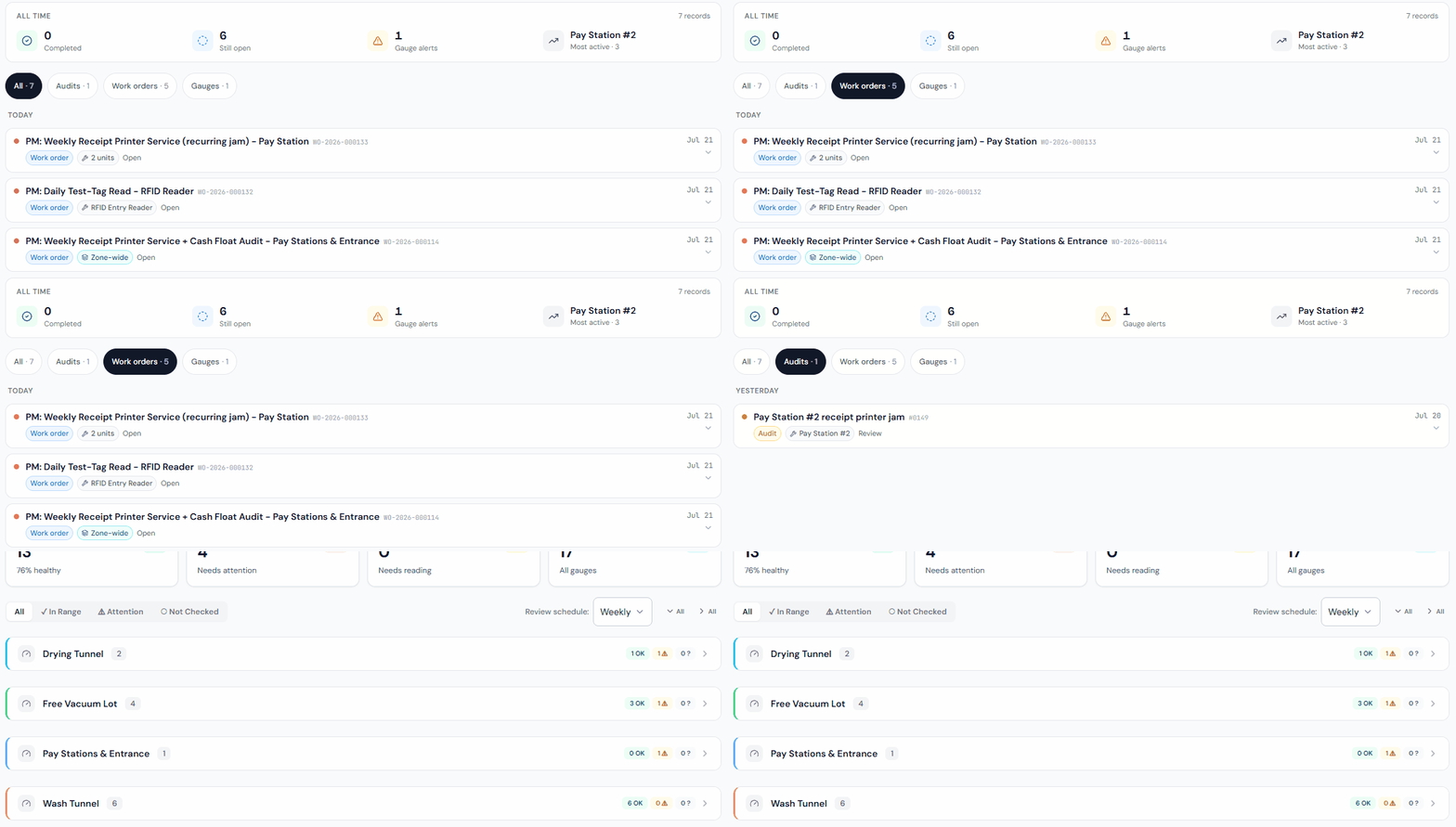
When a zone's total looks off, the first question is always "what happened here?" Each zone has a Total History — one timeline of everything that changed it, with who and when — and this cycle it got much faster to read:

A summary strip across the top of your chosen timeframe: how many work orders were completed, how many are still open, any gauge alerts, and the most-active piece of equipment.
Date sections — Today, Yesterday, This week, This month — so the timeline scans instead of scrolls.
Filters that keep up: pick a timeframe or a specific piece of equipment and the counts update to match, with empty options greyed out so you never land on "no results."

No more reconstructing the story from memory — it's just there, on web and mobile.

Watch a zone's Total History filter live: the summary strip up top — completed, still open, gauge alerts, most-active unit — then tap a source chip (Work orders, Audits, Gauges) and the dated timeline narrows to match.

More Improvements

The smaller upgrades, grouped the same way.

Sensors & Devices

Droplet water sensors get trend graphs. Leak sensors now chart usage and flow over time with a Usage / Flow toggle, and "today's usage" rolls over at midnight in your wash's own time zone — so the day's total lines up with your real day.
Relay schedules, in one place. If you set a relay's schedule in the Shelly app, it now shows right on the relay's card in WashConsole (view-only), and that card got a cleaner design to match your other sensors.

Scheduling & the Time Clock

See the hours as you build a shift. Add and Edit Shift now show the real "scheduled to work" time — the shift length minus any unpaid breaks, and correct even for overnight shifts — and the grid roster shows projected weekly hours right next to the payroll total.

Daily Tasks & Inspections

A better Custom List editor. Add tasks inline with everything in one spot — priority, photo requirement, linked SOP, zone, and description — on a cleaner, clearer layout, and template tasks are editable now too.
Work orders get real ticket numbers. Every work order now carries one clean, predictable number — like WO-2026-000123 — everywhere it shows up, and each one is unique. Older numbers still work in search, so a ticket you printed last month still pulls up its work order.

Inventory & Equipment

Add a zone from anywhere. Anywhere you assign a zone — a task, a piece of equipment, an inspection — you can now create one on the spot instead of detouring to settings first.

Across the App

Photos upload the moment you pick them. Across complaints, tasks, and work orders, photos start uploading immediately with visible progress, so saving is quick even on wash-bay Wi-Fi — and a photo you attached is a photo that's truly saved.
Chat notifications jump to the exact message. Tapping a chat notification now takes you straight to that message in the conversation, not just the channel.
Choose how AI builds your quizzes. When LEARN generates a test from a lesson, you can now pick the number of questions and the question types — single answer, multiple answer, true/false — before it writes a thing.
A cleaner mobile app, coming in the next update. The iOS app gets a refreshed bottom navigation — one clean row, clearer badges, and a polished look on the newest iPhones — and photos and videos in training lessons look better, too.

That's the two weeks. Sensors has been one of our most-requested capabilities since day one, and the smarter schedule is a close second — we'd love to hear what you connect first, and which shift you fill fastest with a bonus.

Built by Carwash Operators, for Carwash Operators. Learn more at WashConsole.

Chat