Back to Blog

What's New in WashConsole August 14, 2026

Safety is here: report an injury, a near miss, or a customer incident and follow it through to closed. LEARN now shows who holds which certificate, and a task or an inspection can require a valid one before anyone completes it. Worked hours go straight to Netchex, the Time Clock shows every punch behind a number, new hires set their own kiosk PIN at the tablet, and inspections can run hourly.
WashConsole Team/August 14, 2026/8 min read
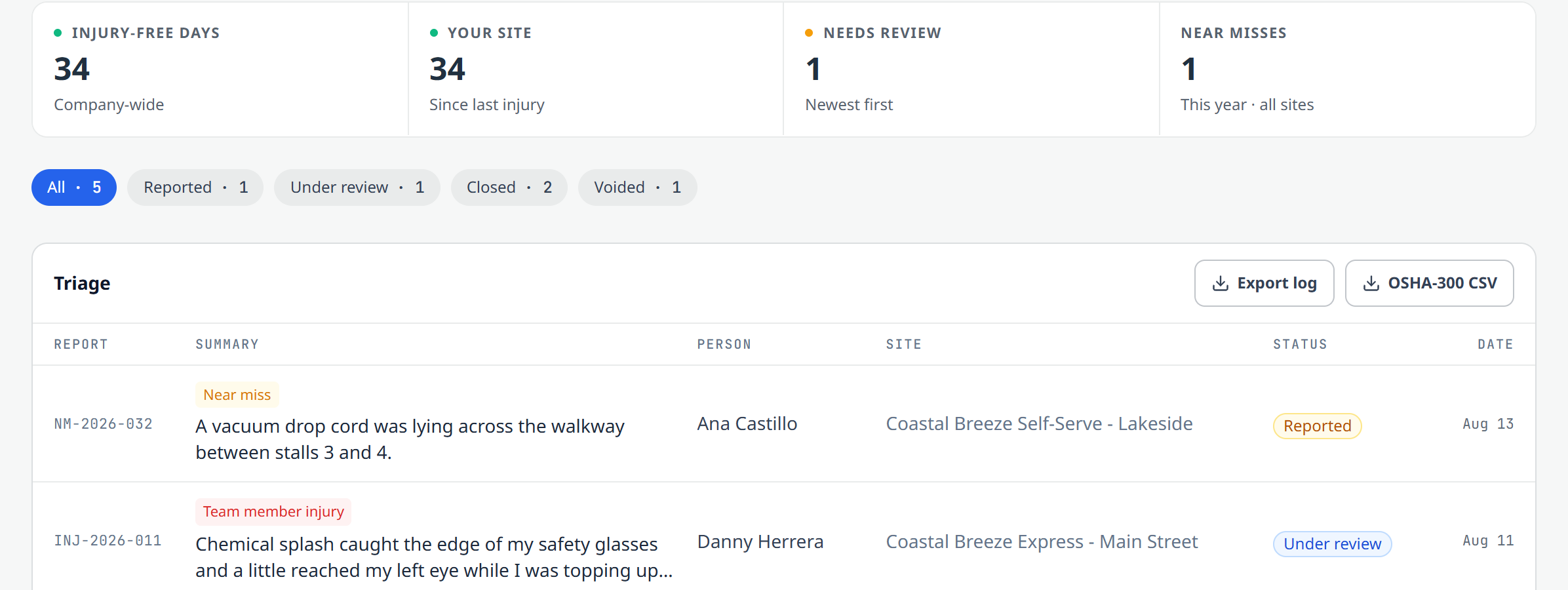
The new Safety page: 34 injury-free days company-wide, one report waiting on review, and a triage list showing a near miss, a chemical splash under review, and a closed customer incident.

The Short Version

Safety is the headline. Report an injury, a near miss, or a customer incident, attach photos, and follow it through review to closed, with an exportable log at the end of it.

Training goes deepest. LEARN now shows who holds which certificate and where it stands, and a task, a list, or an inspection can require a valid one before anyone is allowed to complete it.

Beyond those two: worked hours go straight to Netchex, the Time Clock shows every punch behind a number, a new hire sets their own kiosk PIN at the tablet, and inspections can run hourly.

All of it is live on the web app today, and most of it is on the mobile app too. Safety and the Netchex connection are switched on per account, so ask us if you want either.

A few favorites
01
Safety.
Injuries, near misses, and customer incidents in one place, with an exportable log.
02
A credential wall.
Who is certified on what, who is expiring, and who has nothing on record.
03
Certificates that gate the work.
Only a valid holder can complete the task that requires one.
04
Every punch behind the number.
Tap a person's hours and see each clock in and clock out.
05
PIN setup at the tablet.
A new hire taps their name, picks a PIN, and clocks in.

Major Updates

TeamConsole

Safety

New. A place for the part of the job nobody plans for.

Anyone on your team can file, and there are three kinds because they are genuinely different: a team member injury, a near miss where nothing happened this time, and a customer incident. The near miss is deliberately short, four questions and about a minute, because a near miss you never write down is just a story.
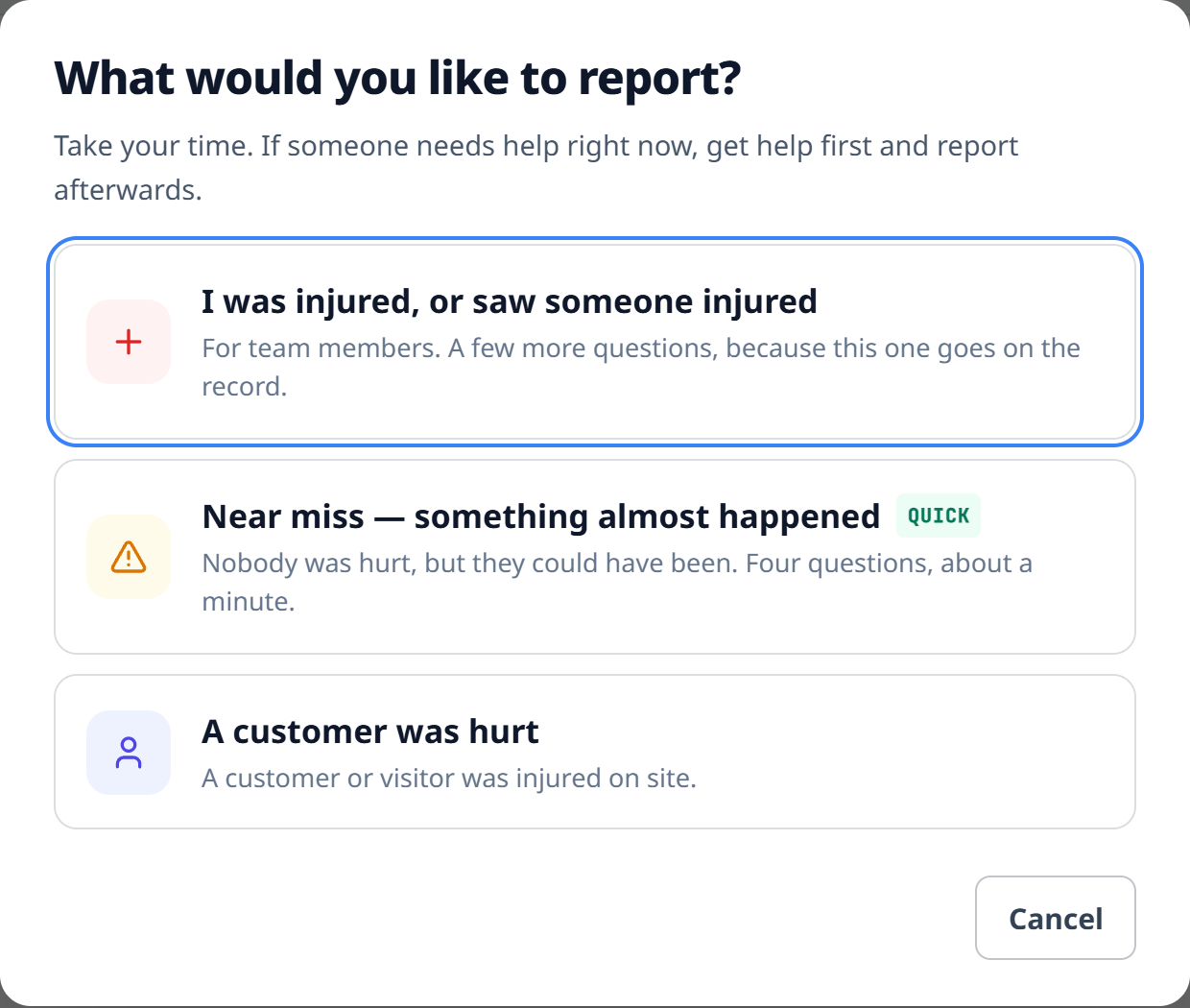
The reporting picker: I was injured or saw someone injured, Near miss (marked quick, four questions, about a minute), and A customer was hurt, under a heading that says take your time and get help first if someone needs it.

For managers it becomes a queue: everything filed, filterable by where it stands, with the follow-up attached to each one.

Manager detail with OSHA classification, workers' compensation, and private investigation notes the person who filed never sees.
Photos attached to a report on the web app, and viewable everywhere.
Injury-free days company-wide and at your own site.
Exports when someone asks: a general log, or an OSHA 300 style CSV.

Filed in error? Void it. The report stays in the history with the reason and stops counting toward your stats, because deleting the record is the one thing you do not want.

Filing works on the phone with no signal. Write it up in a back room with no bars and it sends itself when you are back in range.

Safety is in beta. Ask us and we will switch it on.

LearnConsole

WashConsole LEARN

Training you can prove, and now enforce.

An operator we talked to keeps a paper training passport for his crew: one line per skill, a trainer's initials, a date. WashConsole held all of that and could not show you that sheet. Now it can.

A credential wall

The LEARN Directory answers "who is certified on what, and who still needs it," readable two ways: by person, or by credential so you see everyone who holds Chemical Safety and everyone who does not. Professional certificates like OSHA 10 and First Aid sit alongside the training you assign, and counts across the top track certified, assigned but not earned, expiring soon, and lapsed.

Somebody with nothing on record reads as "No credentials on record," a real answer instead of an empty box.
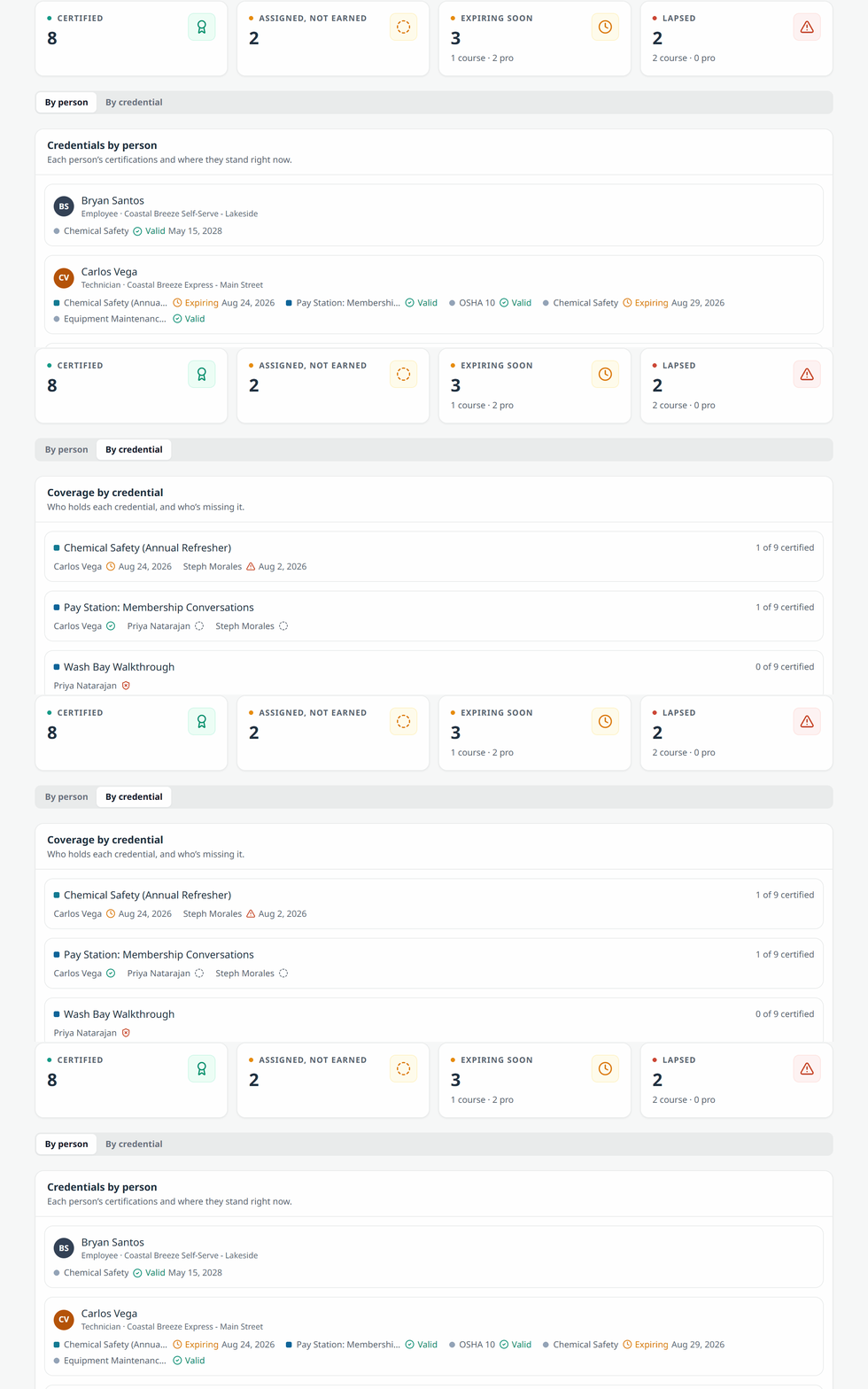
Watch the credential wall flip from By person to By credential: the same standings, first grouped by who holds what, then by which certificate it is, with valid, expiring, and lapsed called out in each row.

Require a certificate to do the work

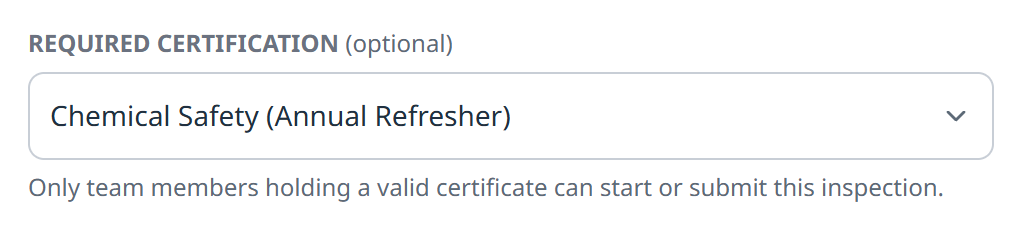
A credential wall tells you who is qualified. This makes it matter. A task, a custom list, or an inspection you set up can now require a certification, and only someone holding a valid certificate can complete it.

It is the control you want where "I watched someone do it once" is not good enough: chemical handling, the monthly water treatment PM, anything that ends in a report with your name on it.
Managers set it, not everyone.
No exceptions by rank. An owner without the certificate is as locked out as anyone else.
Expiring still counts as holding, so nobody is stranded mid-shift.
The Required certification control on an inspection, set to Chemical Safety (Annual Refresher), with the note that only team members holding a valid certificate can start or submit it.

Courses and onboarding

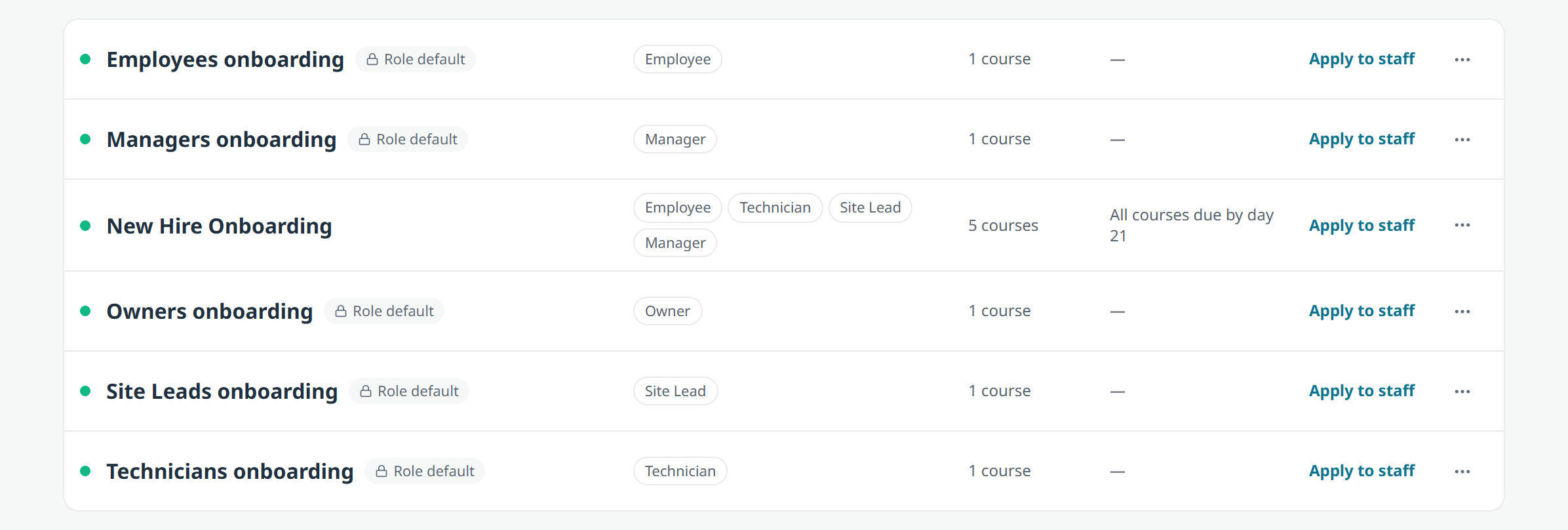
Course cards show what matters at a glance: published or not, who they are assigned to, when they are due, and how far along everyone is. New-hire paths group into collapsible sections by site with live outcomes on each step.
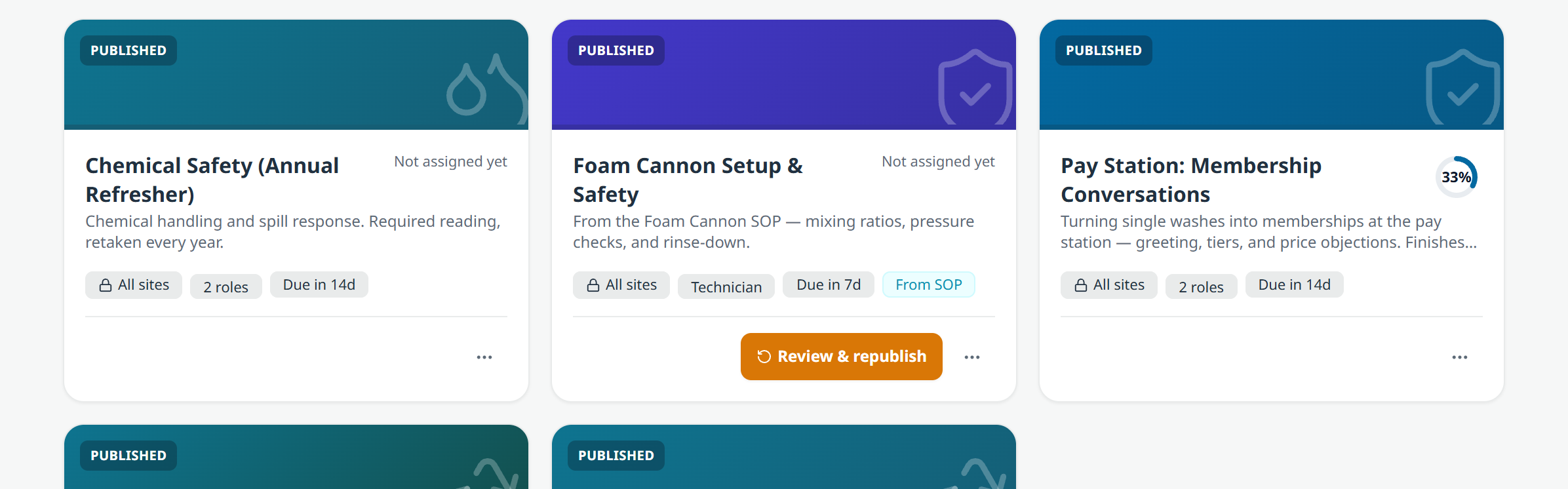
Two published course cards, Wash Bay Walkthrough and Wash Safety Certification, each showing site scope, assigned roles, a due window, and a completion ring.
An onboarding path broken into steps with live progress on each one.

Video, and building from what you have

Video is on for every account now, on web and mobile. Record a tunnel walkthrough on your phone and drop it into a lesson. Turn on require the whole video and a lesson does not count as watched until it has been. Uploads show real progress with a cancel button that cancels, and clips from an iPhone are compressed once on the way in instead of twice.

The AI course builder also takes more of your existing material: on top of PDFs it now accepts Word documents, PowerPoint decks, and plain text, so the chemical supplier's deck becomes a real course with a knowledge check.

A few smaller things landed alongside: preview a training before you add it, learners see the questions they missed, certificate expiry and retake frequency merged into one Retake Period, and My Training opens on a Learning Journey stepper. Every catalog and course is now public on our site.

TeamConsole

Payroll

Worked hours can go straight to Netchex.

Connect the two, match your people to your Netchex employees once with a guided wizard, and map your earnings codes. Then for a finished pay week: preview what will be sent, push it as pending paycheck earnings, and undo it from the history if something was not right.

Pay rates never leave WashConsole. Hours go out. Money does not.
Completed weeks only. The preview is of a week that has already finished, never a live one.

There is a per-employee override too, so the one person whose overtime rides a different earnings code does not send you back to the spreadsheet.

The Netchex panel: sends each closed week's worked hours, hours only and never pay rates, with earnings codes, how many of the team are matched, and the overtime threshold.

Integrations is now a register alongside it: every system WashConsole exchanges data with, what moves, which direction, and when it last moved.
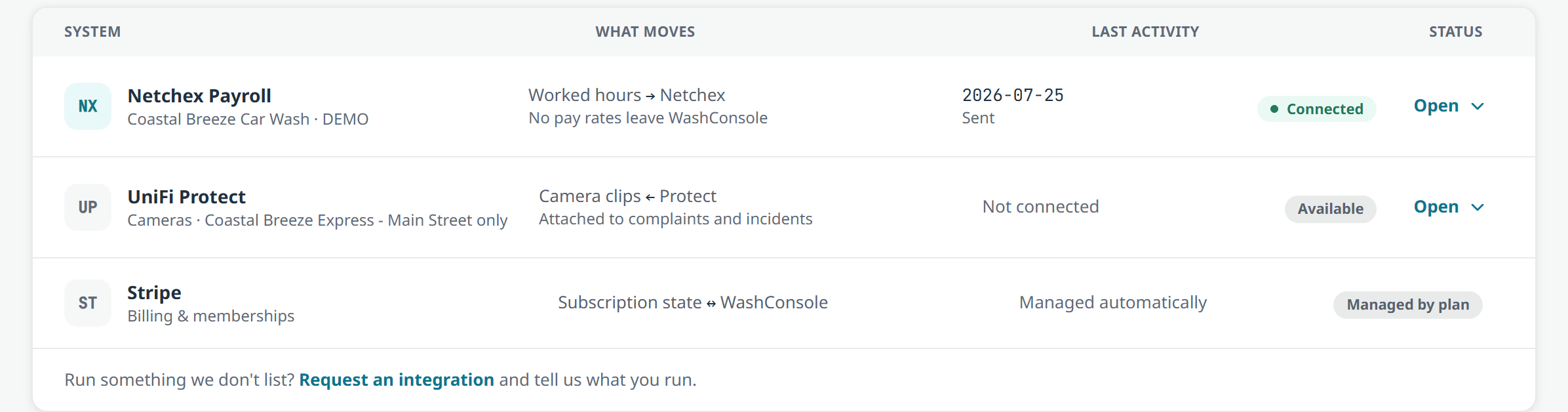
The Integrations register: Netchex Payroll showing worked hours going out and no pay rates leaving WashConsole, last sent on a dated stamp, alongside UniFi Protect and Stripe.

Netchex is switched on per account. Ask us and we will turn it on.

TeamConsole

Time Clock

Four weeks at once, and the punches behind every number.

The manager side is now organized into Hours, Needs Review, Attendance, Requests, and History.
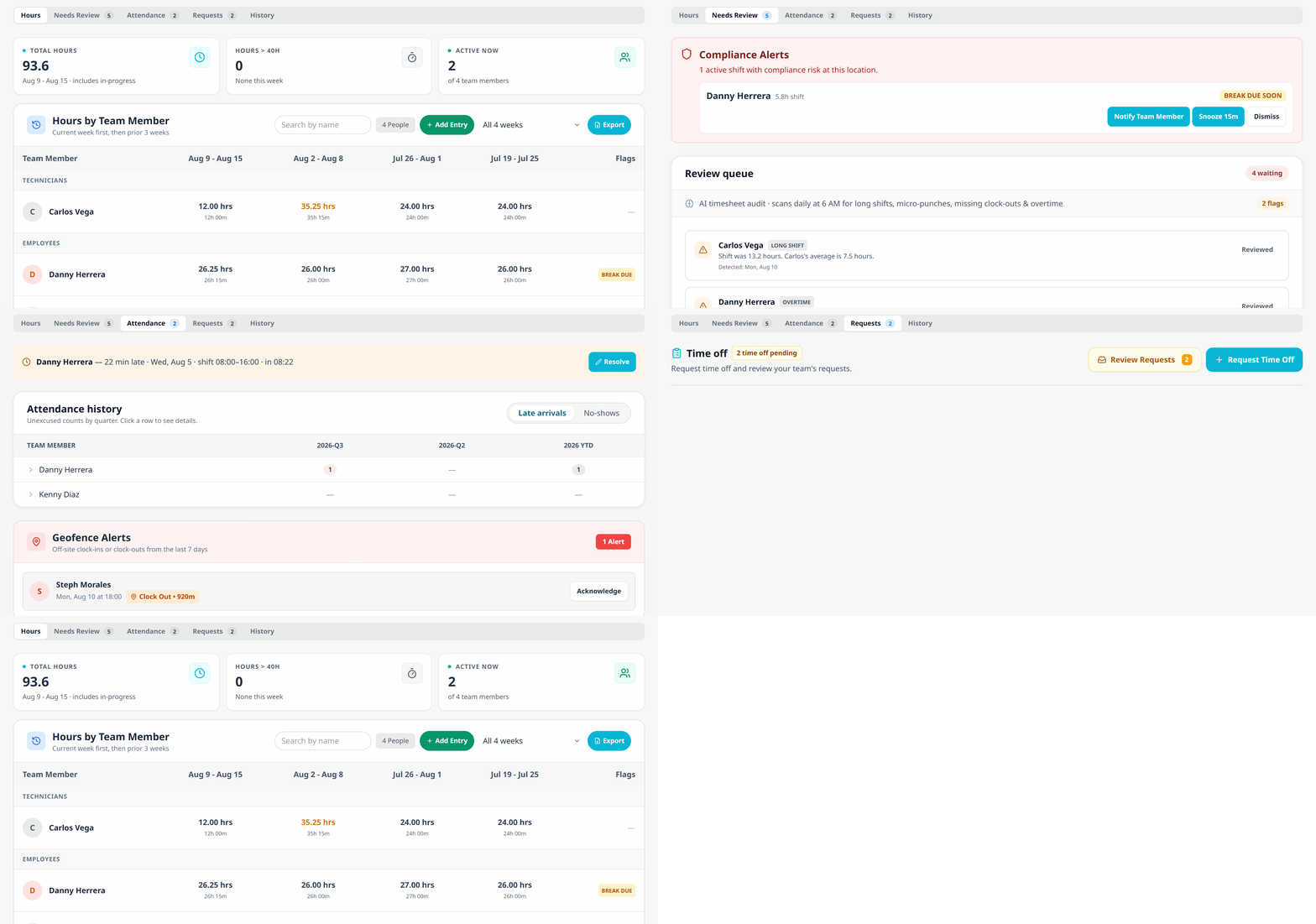
Watch the Time Clock move through its tabs: Hours, then the Needs Review queue, then Attendance with late arrivals up top, then Requests, and back to Hours.

Hours

Hours by Team Member shows the current week first and the prior three beside it, grouped by role, in both decimal and hours-and-minutes, because payroll wants one and people want the other. Flags sit at the end of the row, so a break that was due or a punch from off site is visible without opening anything.

Any bonus someone earned picking up an open shift rides along here and into the payroll export, which now breaks into day columns and lets you pick the pay period.
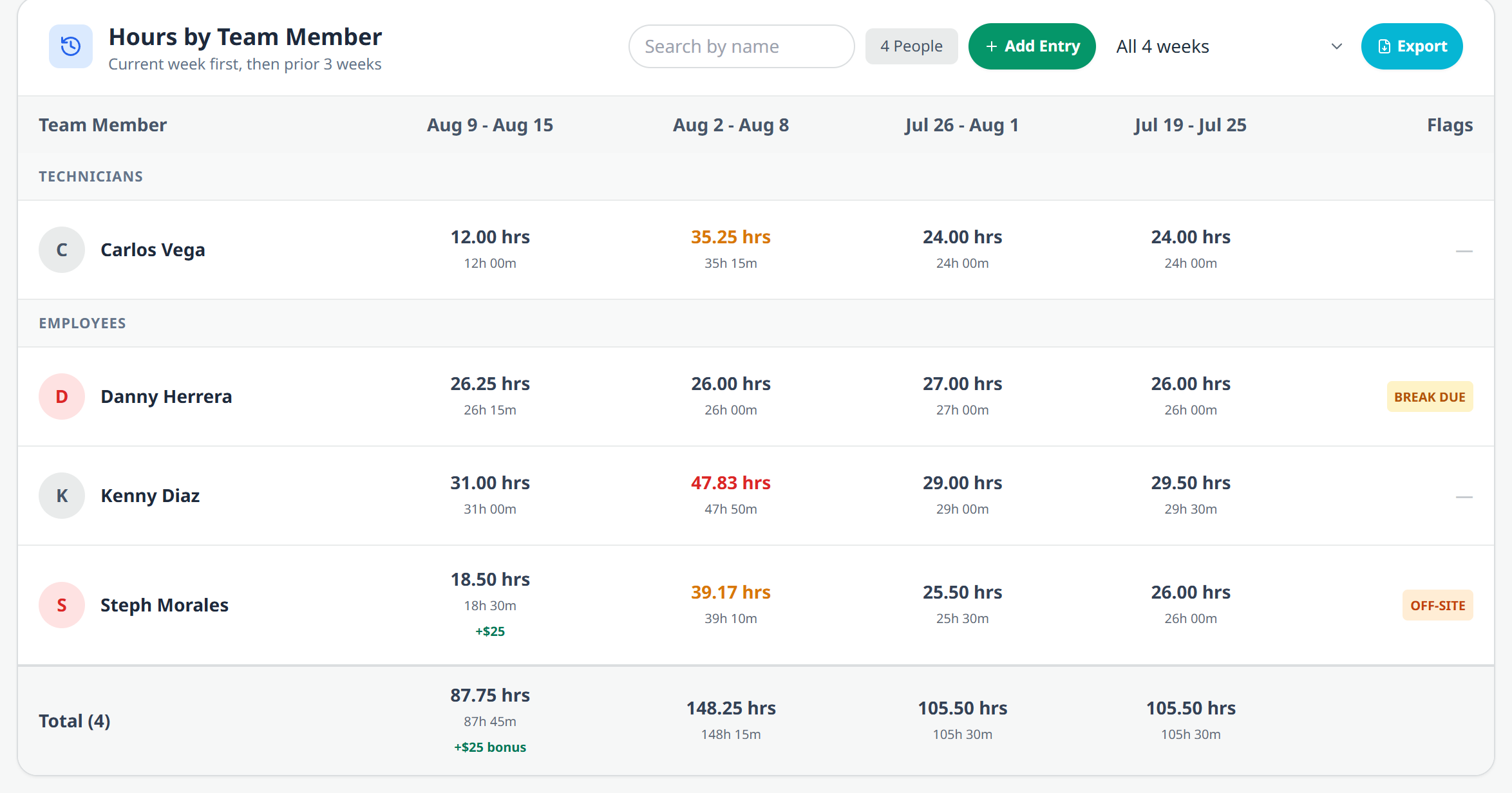
Hours by Team Member showing four week columns, technicians and employees grouped separately, decimal and hours-and-minutes on every figure, a break due and off site flag, and a $25 open shift bonus carried into the week total.

The punches behind the number

"Why does Danny have 26 hours?" used to mean going and looking. Now you tap the person and get every punch: each clock in, each clock out, the break, and the hours it produced, grouped by week with the total at the bottom.

Where your team clocks in with a photo, the photo is right there on the punch, so checking who actually stood at the clock takes a glance rather than an investigation.
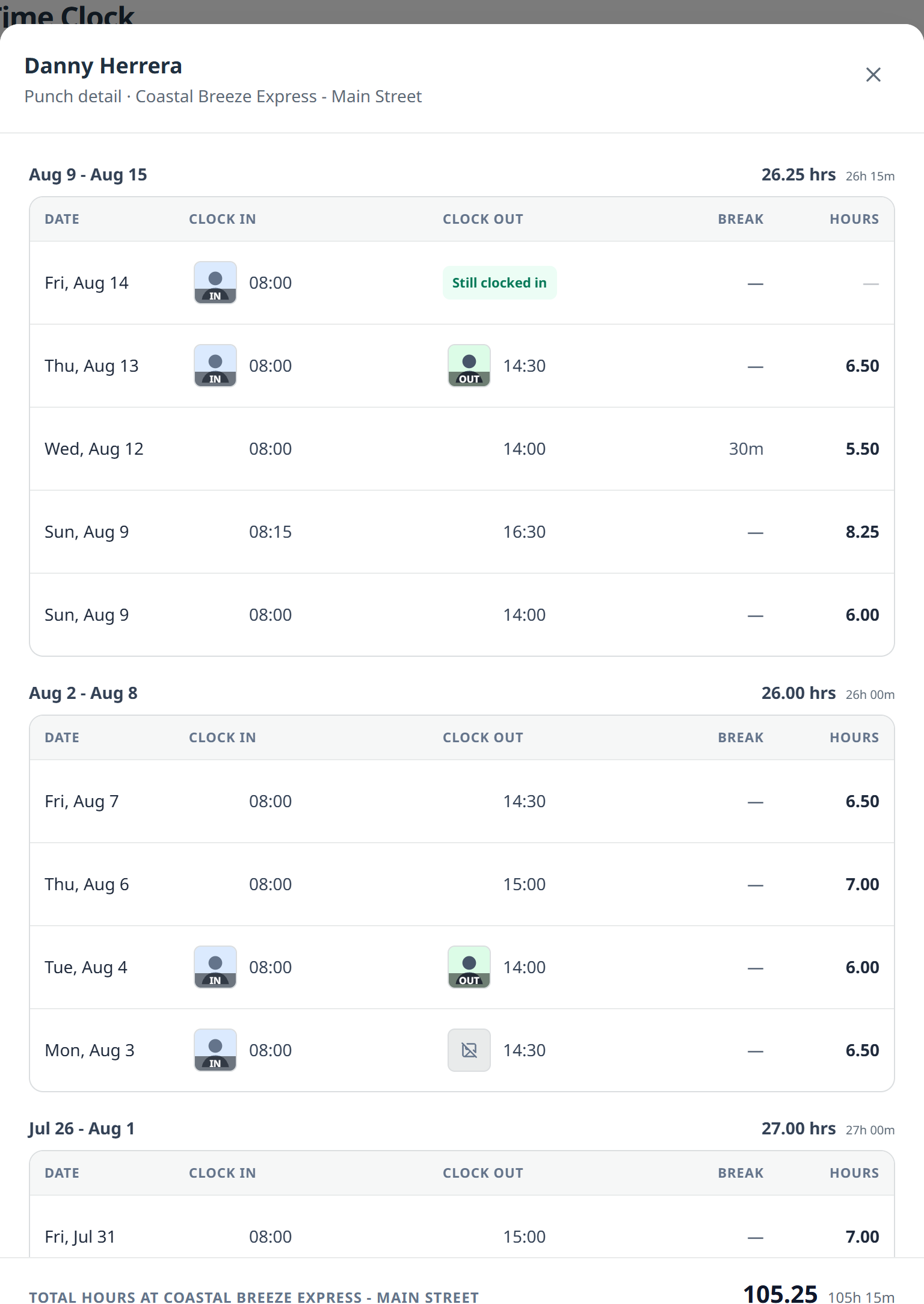
Punch detail for one employee: each day's clock in and clock out with the photo taken at each punch, a still-clocked-in row for today, break minutes, hours per day, and a total at the bottom.

One review queue

The overnight timesheet scan and the pending corrections used to be two separate panels, both looking important on a day when nothing was wrong. They are now one queue that says all clear when it is, and opens into the specific rows when it is not: the audit's flags, then each correction request with what was asked and why, and approve or reject on the spot.
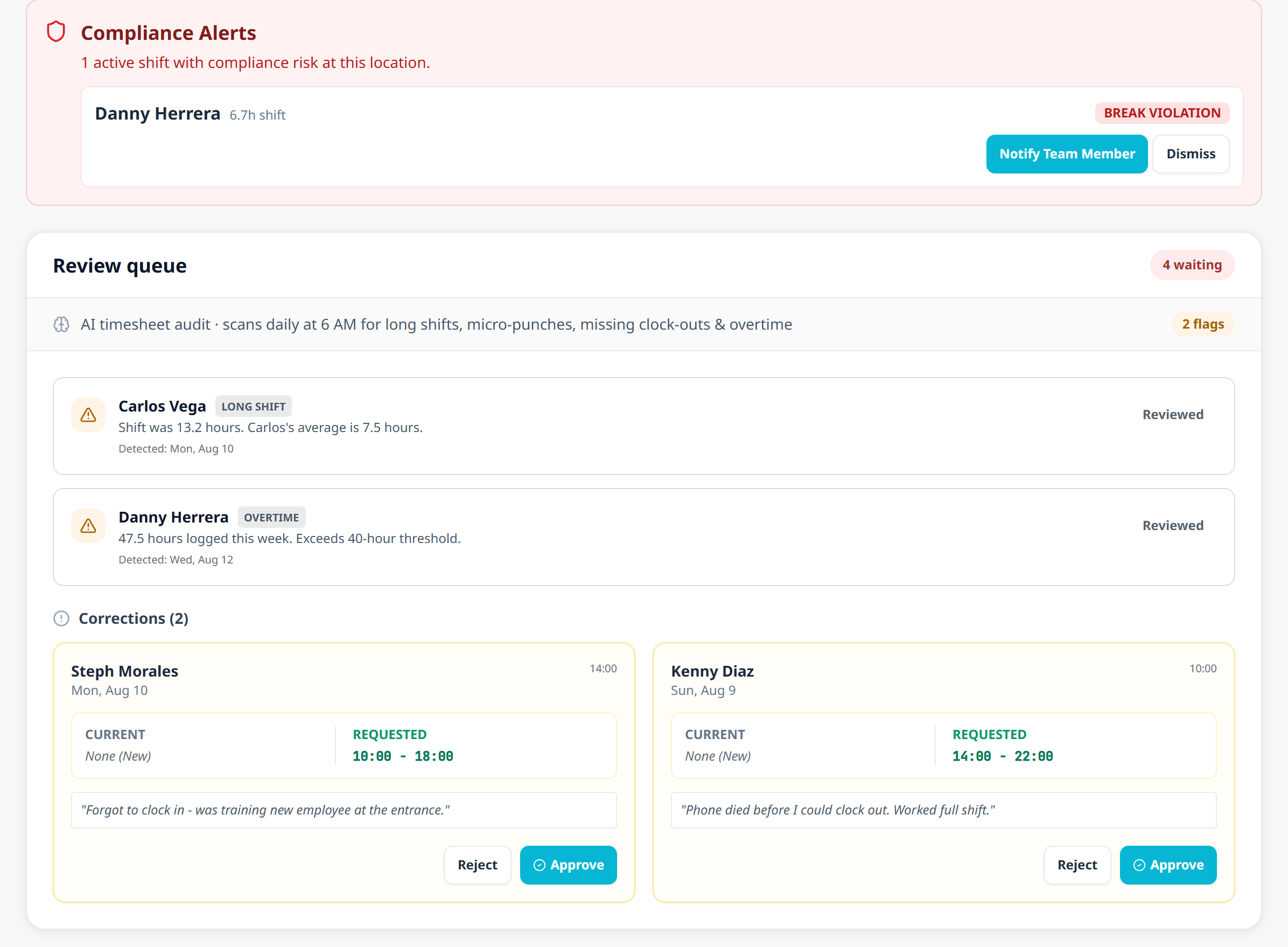
The Needs Review queue: a break violation alert up top, the AI timesheet audit's flags for a long shift and an overtime week, and two correction requests showing current versus requested times with the employee's reason and approve or reject buttons.
TeamConsole

Kiosk

A new hire can set their own PIN.

Setting up a shared tablet used to mean a manager creating a PIN for every single person before anybody could clock in. Now an employee or technician with no PIN just walks up: tap your name, choose a four digit PIN, enter it again, and you are clocked in. No setup first. They get an email confirming the PIN was created, with a "wasn't you?" line in case it was not.

Managers keep the other half on the web app: set a PIN, change one, or clear one for a forgotten PIN or a rehire, from the Kiosk page or the person's profile in the Directory.
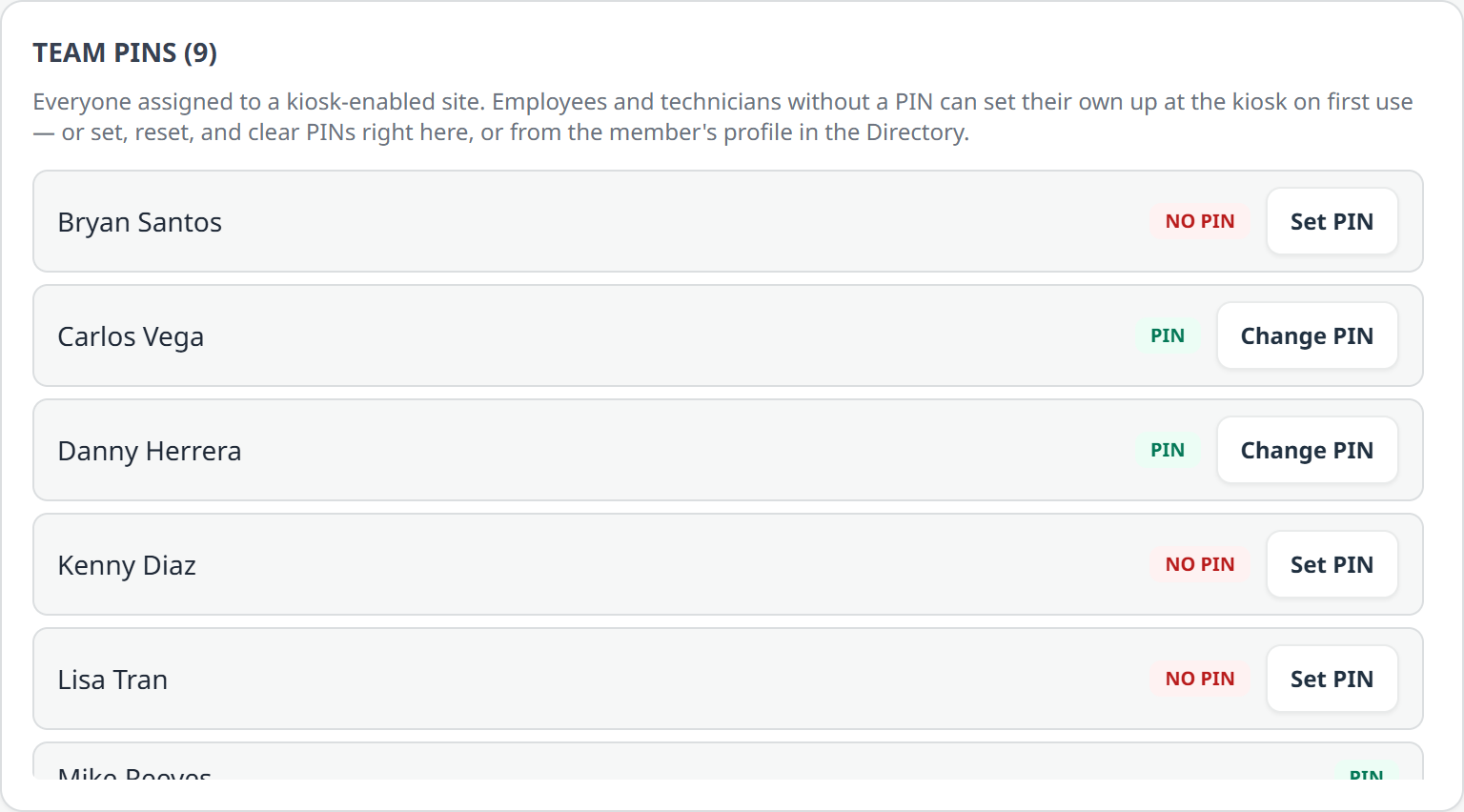
The Kiosk page's Team PINs list: everyone at a kiosk enabled site, showing who has a PIN and who does not, with Set PIN and Change PIN on each row.
TeamConsole

Scheduling

Open shifts go to the right people, with an optional carrot.

An open shift now names the role that can claim it, so only teammates who can actually work it see the slot, and carries an optional pickup bonus. Everyone eligible is emailed the moment it is posted, and if a manager assigns someone directly instead, that person is told.
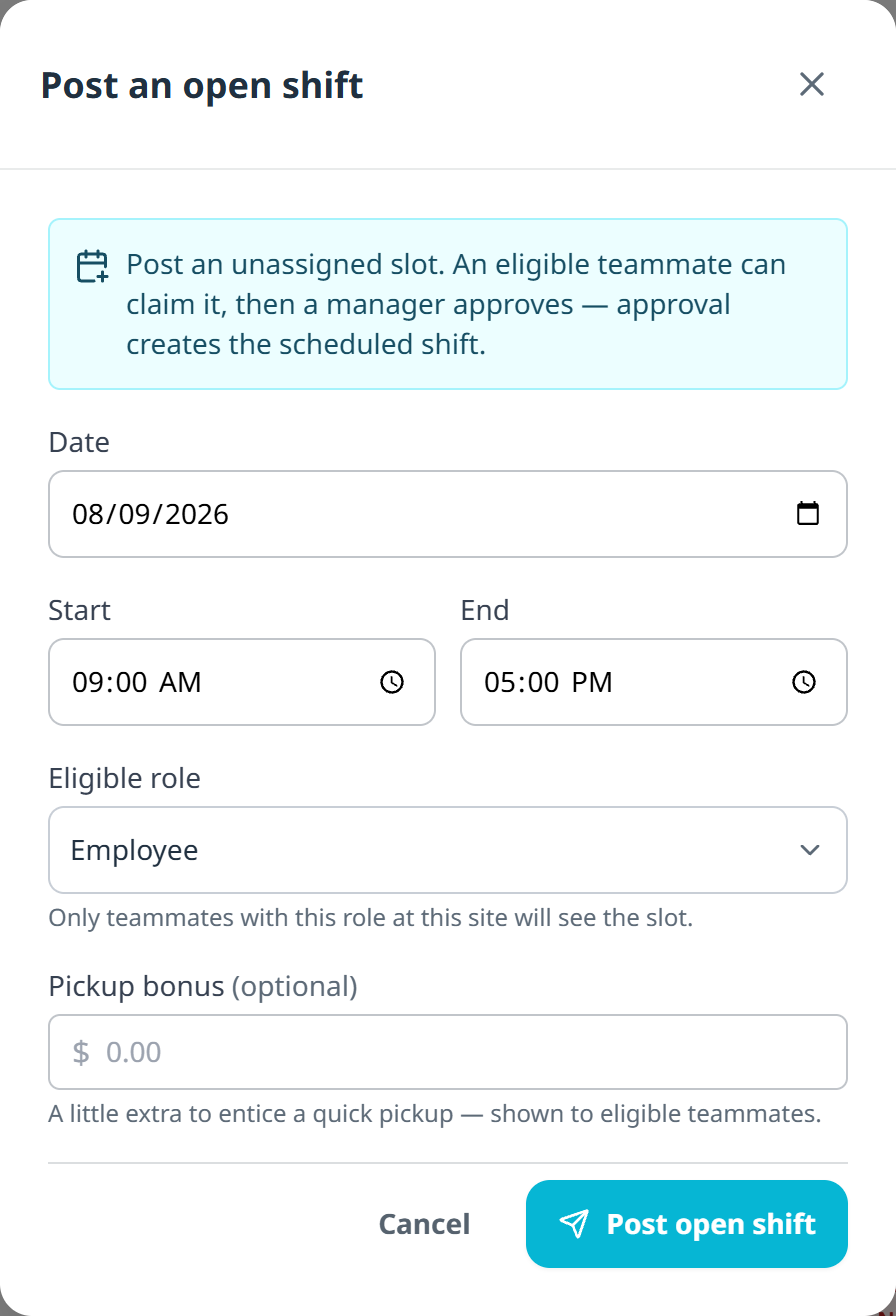
The Post an open shift form: date, start and end, an eligible role set to Employee with a note that only teammates with that role at that site will see it, and an optional pickup bonus in dollars.

Building the rest of the week also got easier:

Give a shift a job role and colour the grid by it, so you can see that Saturday has three prep people and nobody on the pay station. It can be set from the phone too.
Set your own overtime pay rule, so the dollars the scheduler shows are your dollars.
Turn clock in and out off entirely. Some accounts do not punch, and now nothing downstream pretends they do.
Breaks place themselves. Give a break a duration and no time and it drops into the middle of the shift on save.
Set your own shift swap cutoff, so swaps close at a sensible hour instead of ours.
OpsConsole

Inspections

Hourly checks, multi-day monthly, and a grace window.

A tunnel walk is an every-hour job while you are open and pointless while you are closed. Three new scheduling options cover it:
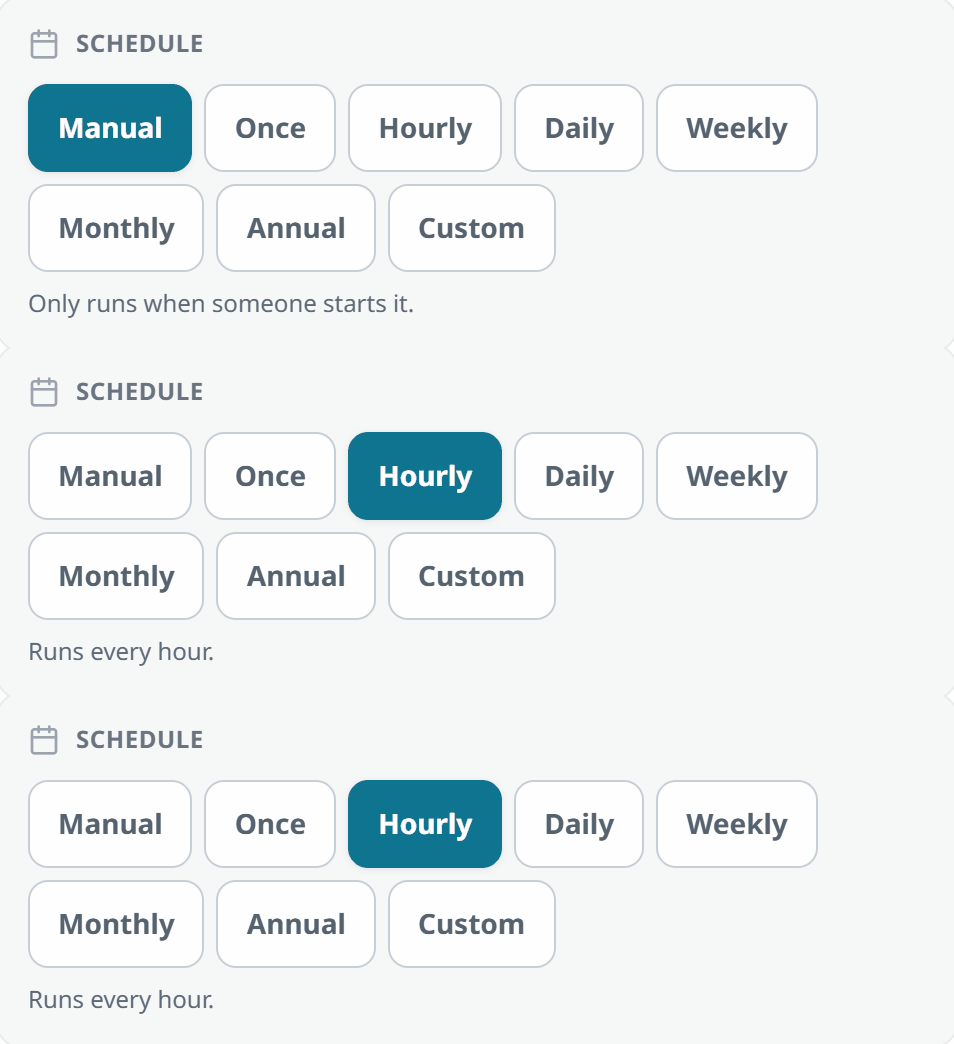
Hourly, anchored to when your site opens. Open at 7:30 and it comes due at 7:30, 8:30, 9:30, and it disappears while you are closed. A slot you miss is gone rather than piling up, because a tunnel check from four hours ago is not worth doing now.
Monthly on several days. The first and the fifteenth, not just one date. Tasks and custom lists gained this too.
An overdue window you choose. Hold an inspection at due for up to two weeks past its date before it turns overdue. Leave it alone and nothing changes.
Watch the schedule picker switch from Manual to Hourly, and the note underneath change to say it runs every hour.

The list itself leads with counted filters, then what needs doing.
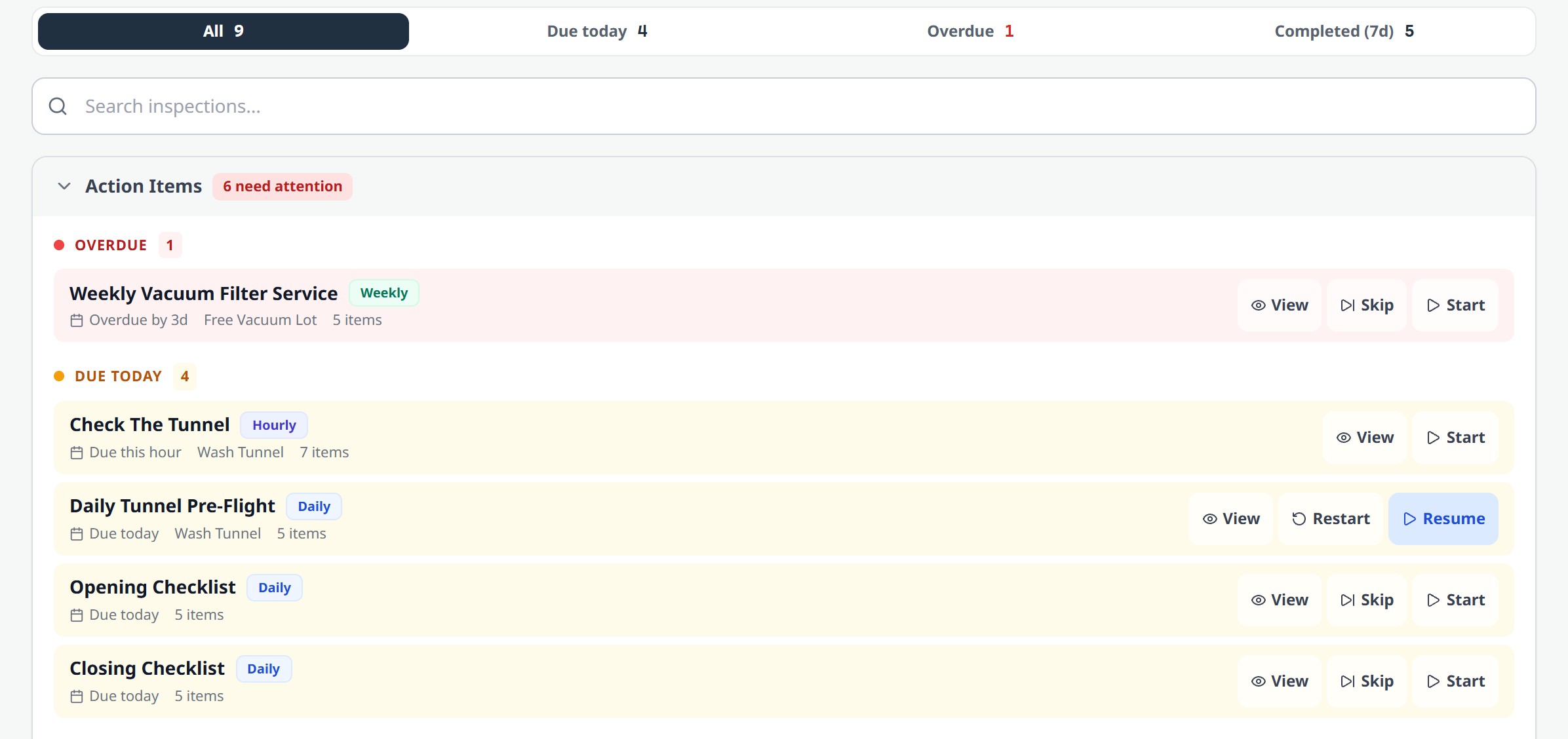
The Inspections list: counted filters for all, due today, overdue, and completed, an overdue weekly service, and today's work including an hourly tunnel check due this hour and a daily pre-flight with a Resume button.
OpsConsole

To-Do & Daily Work

Lists that show up when they are relevant.

A list that surfaces on a hot or wet day now tells you the reason it appeared, right on the chip. While you are setting one up, it also tells you whether today's conditions would trigger it, so you are not guessing.

Suggested lists on the To-Do page: a Rainy Day Checklist tagged Weather, a Snow Day Checklist because the forecast low is 28°F, a Heat Advisory Prep because the chem storage sensor is over 90°F, and an Interior Detail Push because rain is likely.
Open at a time, due by a time. A custom list can stay out of the way until 2pm and be due by 4pm.
Drag tasks into the order you do them, so a list reads in walking order.
Work that never got done is documented. At day's end, tasks nobody completed are retired and written down instead of rolling forward forever, and managers get the summary.
Choose who hears about a completion by role, rather than naming people one at a time.
ChatConsole

Team Chat

Channels that keep their own roster.

A channel can now belong to a site. Once it does it maintains itself: assign someone to that site and they join, move them and they leave. No more chasing membership by hand after every transfer.

The list got easier to read with it. Channels group by type into collapsible sections, and archiving a channel finally has an inverse: restore it from the archived panel instead of rebuilding it.
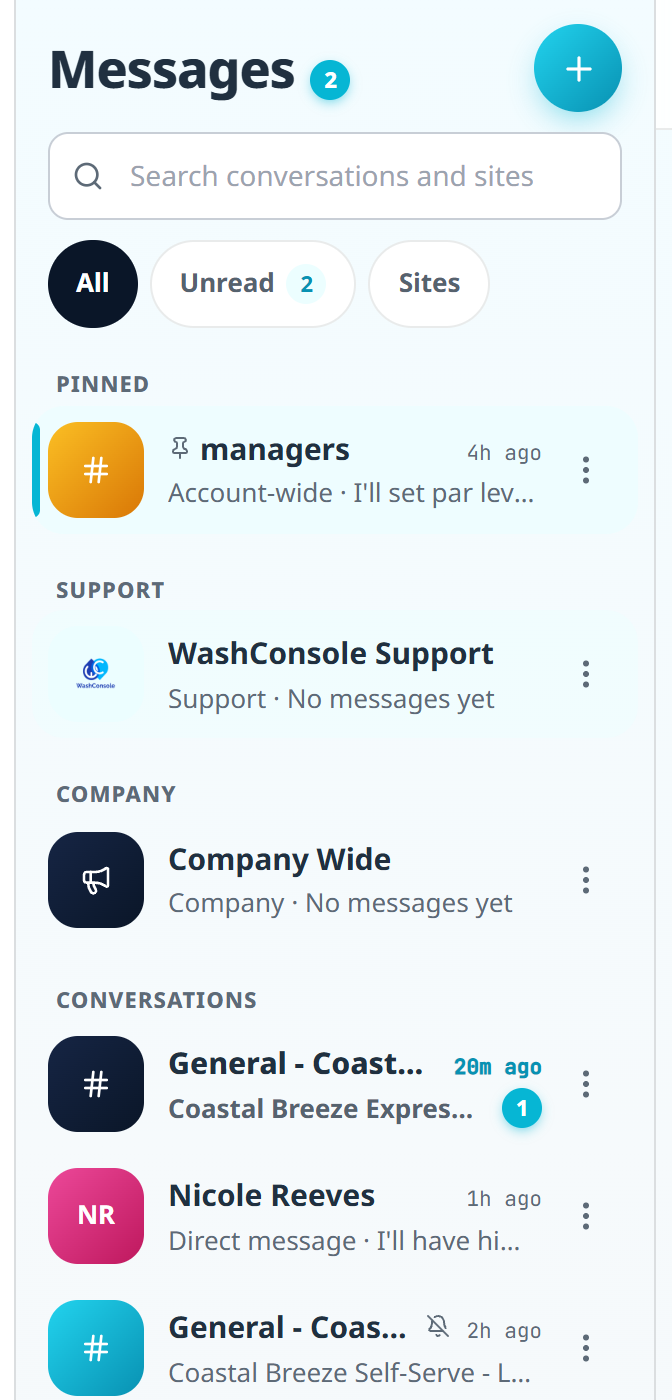
The conversation list grouped into sections: Pinned, Support, Company, and Conversations, with site General channels and direct messages, unread counts, and a filter for All, Unread, and Sites.

Sending things got tidier too. Photos, videos, and files now live behind one attach button, and a pasted link shows where it actually goes instead of the tracking exhaust it arrived with.

TeamConsole

Your Team

Celebrations with something to say.

Birthdays and work anniversaries can be shared into chat, and the person sharing can now add their own note to the card, so it reads like a coworker said it rather than a system did.
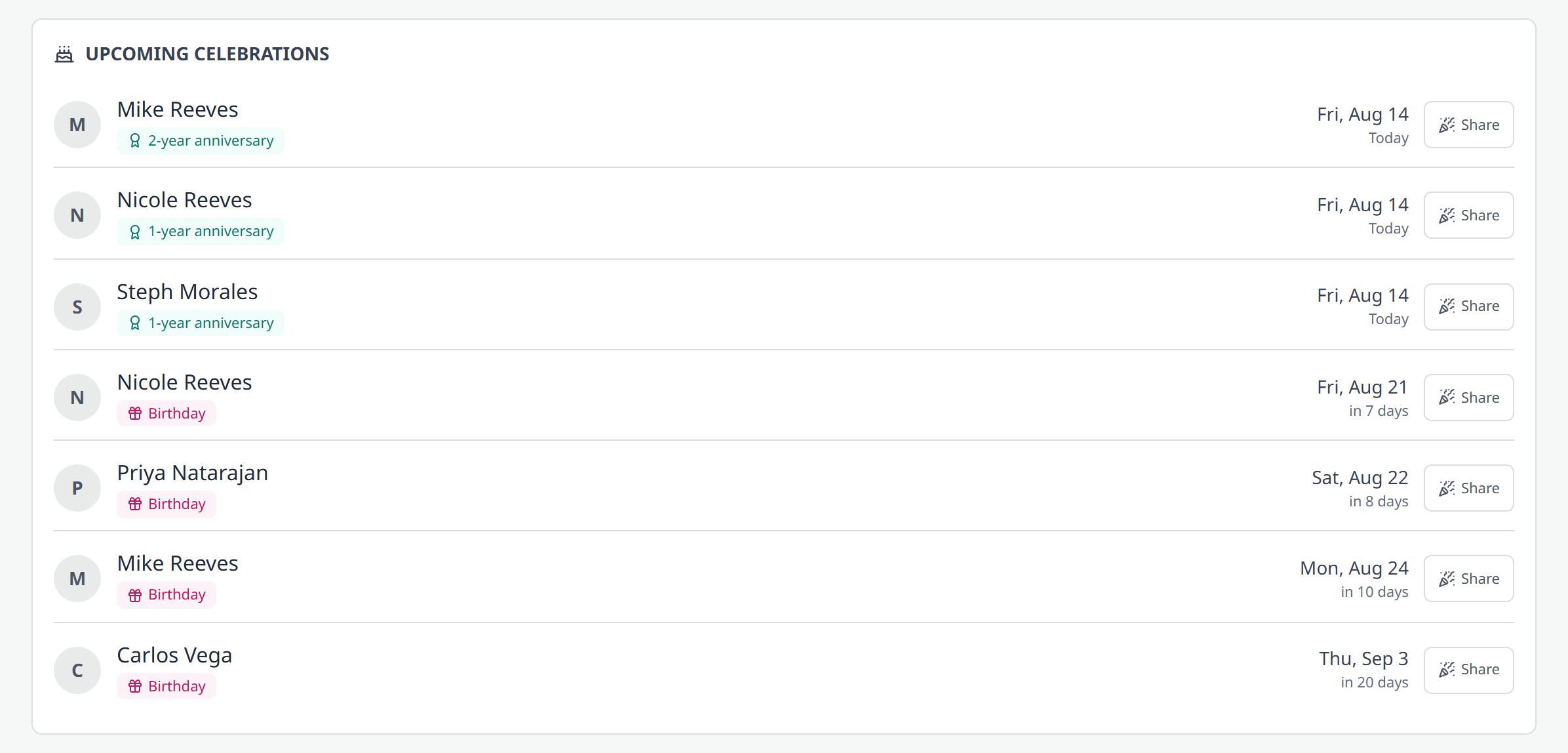
Upcoming celebrations in the Directory: work anniversaries and birthdays over the next few weeks, each with a Share button.

The mobile app also caught up on notification settings. It had four toggles where the web app had forty five, which made "turn this off in Settings" a dead end for iPhone users. It now has the full set, grouped by category, with email and push controlled separately.

StockConsole

Inventory

Counted filters, whole containers, and orders you can take back.

Inventory leads with a plain count of what is out, low, and in stock, and every filter carries its own number so you know what is behind it before you click.
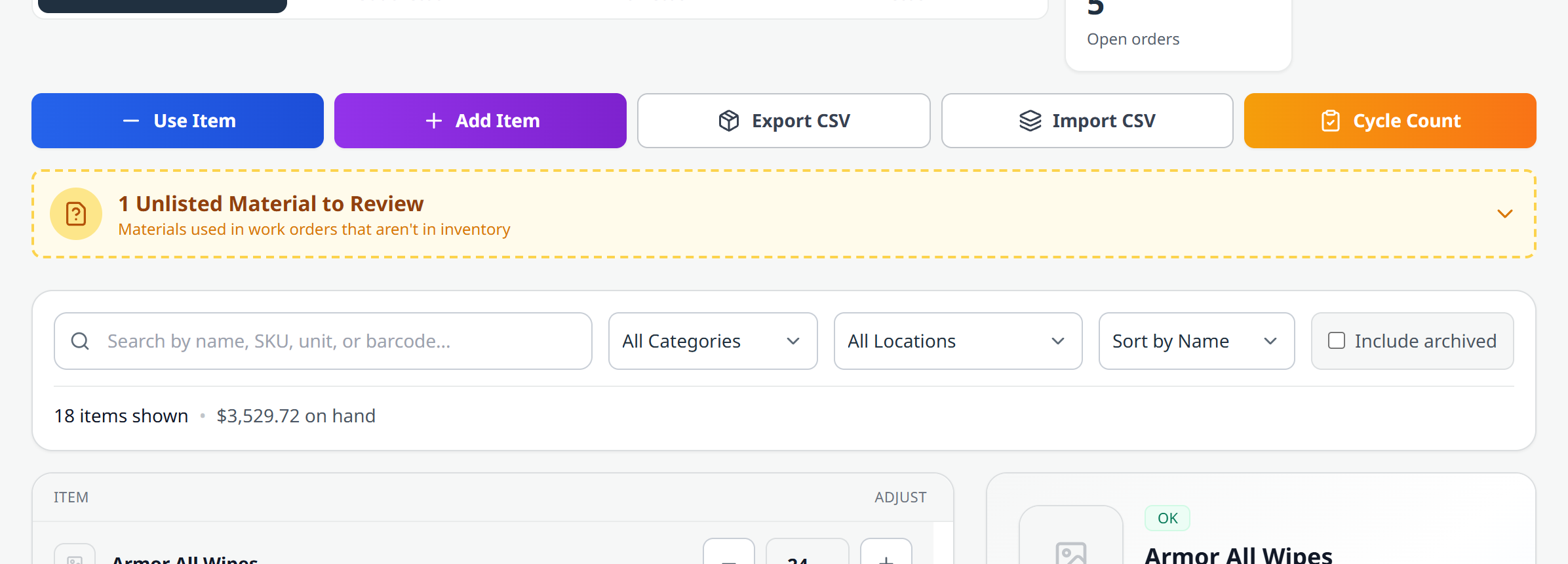

The Inventory filters: all 18 items, 0 out of stock, 7 low stock, 11 in stock, with auto reorders and open orders alongside, above the item cards.
Order in whole containers. If a chemical comes in 5 gallon jugs, order jugs. WashConsole does the conversion.
Barcodes for items you typed in yourself, generated automatically, so a hand-added item scans like everything else.
Copy a catalog between sites instead of rebuilding it.
A reorder point of zero means off, not "order when the shelf is empty."
Cancelling a supply order can be undone, so a mis-click is not a re-order.
The Orders page: pending, ordered, received, and cancelled counts, with what is awaiting order and what is on the way.
OpsConsole

Equipment & Maintenance

Plain numbers up front on both pages.

Equipment and Gauges now lead with a hero number and a row of counted filters, and options with nothing behind them are greyed out so you never land on an empty list.


Equipment: 32 total, 19 online, 1 offline, 12 in maintenance, with 59 percent operational and total downtime over the last 12 months, above the maintenance calendar.
Gauges: 17 total, 13 in range, 4 out of range, none unchecked, with a healthy percentage alongside.

And archiving a zone cleans up after itself, closing the work orders that belonged to it.

Platform

Across the App

A cleaner look, and search you can find.

The app interior got a visual refresh: calmer greys, a cleaner typeface, softer cards, and one consistent set of status colours so "needs attention" looks the same everywhere. Our cyan is still our cyan. Nothing moved, so nothing needs relearning.

A Search anything bar now sits at the top of the sidebar, and Command K (or Ctrl K) opens it from anywhere. It was previously reachable only by that shortcut, which meant it was invisible unless you already knew about it.

The iPhone app got the same treatment, with a cleaner Time Clock front and centre.

More Improvements

One camera scanner. Scanning a barcode looks and behaves the same everywhere now, with pinch to zoom, tap to focus, a torch button, and scanning cropped to what is actually inside the frame.
Sensor Store. A cleaner storefront for the leak, temperature, and switch hardware that plugs into Sensors.
A better daily quote. The inspiration catalog was rebuilt to 403 quotes with real, checked attributions.
Work order assignment emails. Getting assigned a work order now emails you, and opting out of one kind of notification no longer quietly silences another.

Safety is the one we would most like to hear about, because it is the feature we hope you rarely need. If you want it, or the Netchex connection, switched on for your account, reply and we will set it up.

Built by Carwash Operators, for Carwash Operators. Learn more at WashConsole.

Chat