Back to Blog
Improvement

What's New in WashConsole July 10, 2026

The Schedule is rebuilt around a week grid with Daily Coverage, Open Shifts, and drag-to-place breaks. A new Site Lead role gives your best hourly worker real manager tools without a promotion. Chat adds a Company-Wide channel and manager moderation, WashBot now cites your equipment's OEM manuals, employees can report work orders, and Complaints gets a cleaner workspace.
WCWashConsole Team/July 10, 2026/7 min read
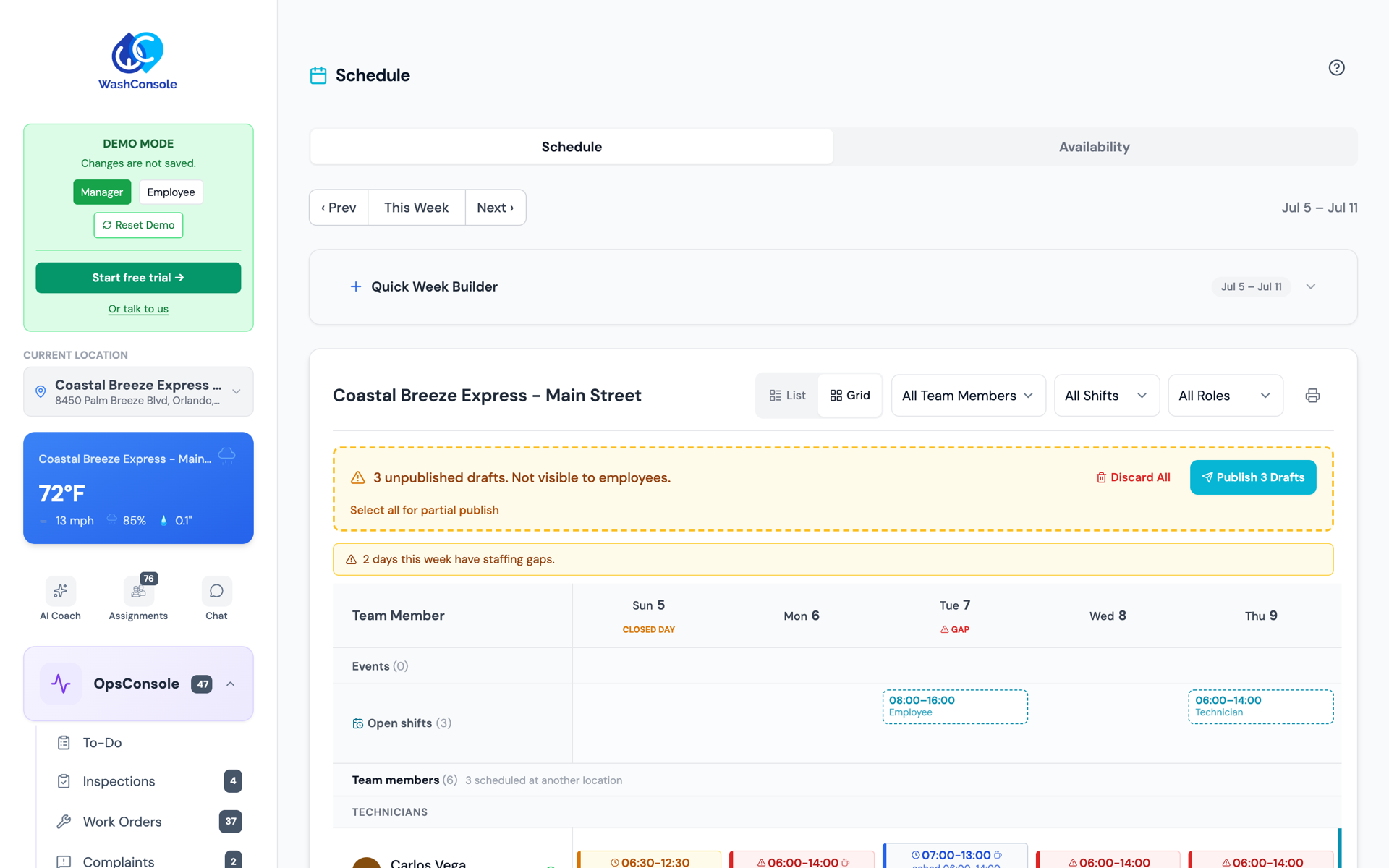
The rebuilt WashConsole Schedule: a week grid grouped by role, with an Open Shifts row and staffing-gap warnings for the week.

The Short Version

This week we rebuilt the part of WashConsole that shapes everyone's day: the Schedule. It's now a clean week grid you can read by role, with a Daily Coverage view that shows you where a day is thin before it goes sideways. On top of that come three things operators have been asking for: Open Shifts you can post for the team to claim, a new Site Lead role, and Break Studio for placing breaks right on the shift.

We didn't stop at scheduling. Chat gets a Company-Wide channel for announcements and the ability for managers to remove any message. WashBot can now answer equipment questions straight from your machines' OEM manuals. Employees can report a work order from the floor, and the Complaints workspace got a cleaner redesign with customer-payout tracking.

Most of this came straight from operator feedback. The web updates are rolling out now, with the latest mobile changes landing in the next app update.

A few favorites
01
The Schedule, rebuilt.
A week grid grouped by role, a Daily Coverage view, and a purpose-built Grid view on phones instead of a squeezed-down desktop table.
02
Open Shifts.
Post a shift as open, let qualified team members claim it, and approve with a tap.
03
A new Site Lead role.
A trusted lead who works an hourly shift and still carries manager tools.
04
Break Studio.
Drag paid and unpaid breaks onto a shift and see the coverage dip they create.
05
WashBot reads your manuals.
Attach an OEM manual to a machine and WashBot answers from it, with a citation.

Major Updates

The Schedule, Rebuilt

Scheduling got a ground-up redesign on both web and mobile. Instead of one dense table, the week is now a grid grouped by role, so you can see your washers, cashiers, and leads as their own bands and spot a gap quickly.

Daily Coverage, up front. A coverage view shows how many people you have on the floor through the day, so a thin afternoon is obvious before it becomes a problem, not after.
A real Grid view on phones. The List/Grid toggle now switches genuine views on a phone. Grid is built for the small screen, with shifts that actually fit, two-line names, and a role subtitle, instead of a shrunk-down desktop layout.
See conflicts before you publish. A pre-publish check surfaces every time-off conflict in the week at once, so you can remove the conflicting shifts and publish in a single pass instead of discovering them one rejection at a time.
A publish email people can act on. When you publish a week, the notification email now embeds that person's actual shifts, and the mobile app shows OFF days clearly so nobody has to guess.

(That's the new Schedule at the top of this post: the week grid, the Open Shifts row, and the "2 days this week have staffing gaps" warning are all part of the redesign.)

Open Shifts

Open Shifts let you post a shift without assigning it to anyone. Qualified team members see it, claim the ones that work for them, and a manager approves. If two people go for the same shift, only one wins it, and an open shift that has already passed can't be claimed. It's the fastest way to fill a Friday night without a round of texting.

The New Site Lead Role

Every wash has the person who really runs the floor: the one who opens, sorts out the problems, and keeps the crew moving, but who is still an hourly team member rather than a salaried manager. Until now your only choices were to give that person no extra tools or to promote them all the way to manager. Site Lead is the role in between.

A Site Lead stays a scheduled, hourly worker who clocks in and out with the rest of the crew, and also carries real manager tools for the shift they run: building and adjusting the schedule, correcting time entries when someone misses a punch, and handling the day-to-day tasks and work orders a shift throws at them.

Why you'd reach for it:

Delegate without a promotion. Hand the day-to-day approvals and decisions to someone you trust, without moving them to salary or changing how they're paid.
Stop being the bottleneck. A missed punch, a schedule tweak, or a task that needs reassigning no longer waits for the owner to pick up the phone.
Coverage when you're off-site. The floor keeps running with someone who has the tools to run it, not just the responsibility for it.

On the schedule, Site Leads get their own band alongside your other roles, so it's clear at a glance who's leading each day.

Break Studio

Breaks are no longer an afterthought. In Break Studio, you drag paid and unpaid breaks directly onto a shift's timeline, and WashConsole shows you the coverage dip each break creates, so you can stagger a lunch rush instead of accidentally emptying the floor at noon. Those breaks then carry through everywhere the schedule appears, from the shift card to the time clock.
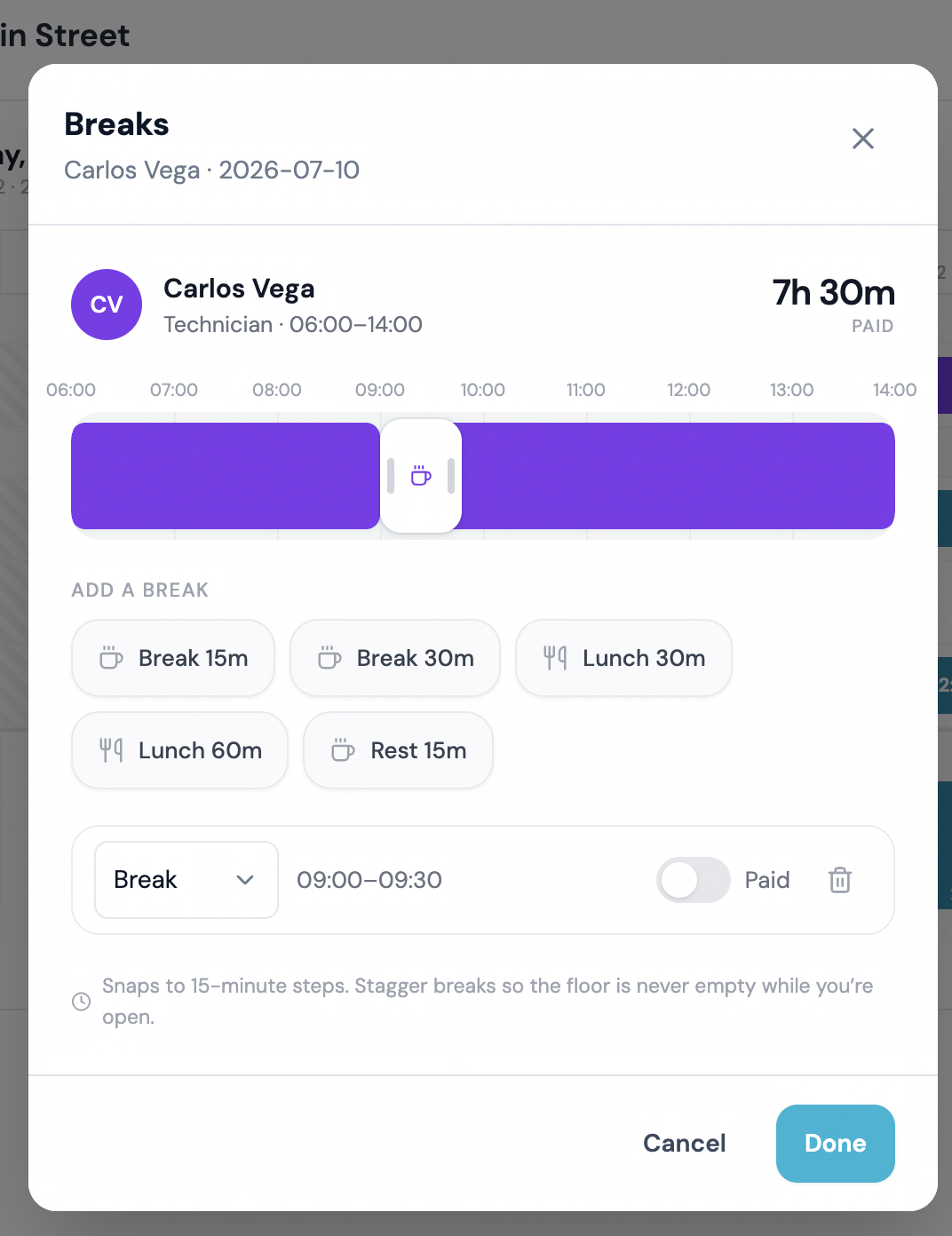
The break editor: open a shift, drop a break onto the timeline, pick Break, Lunch, or Rest, and set whether it's paid. Everything snaps to 15-minute steps.

A Company-Wide Channel in Chat

Chat now has a dedicated home for messages that go to everyone. The Company-Wide channel lives in its own Company section with a megaphone tile, so an all-hands announcement doesn't get lost between site channels. Owners control which roles can post there, so it stays a signal, not a free-for-all.

Managers and owners also get moderation: if something inappropriate lands in a channel, they can remove any message. It's the backstop a team channel needs to stay professional.
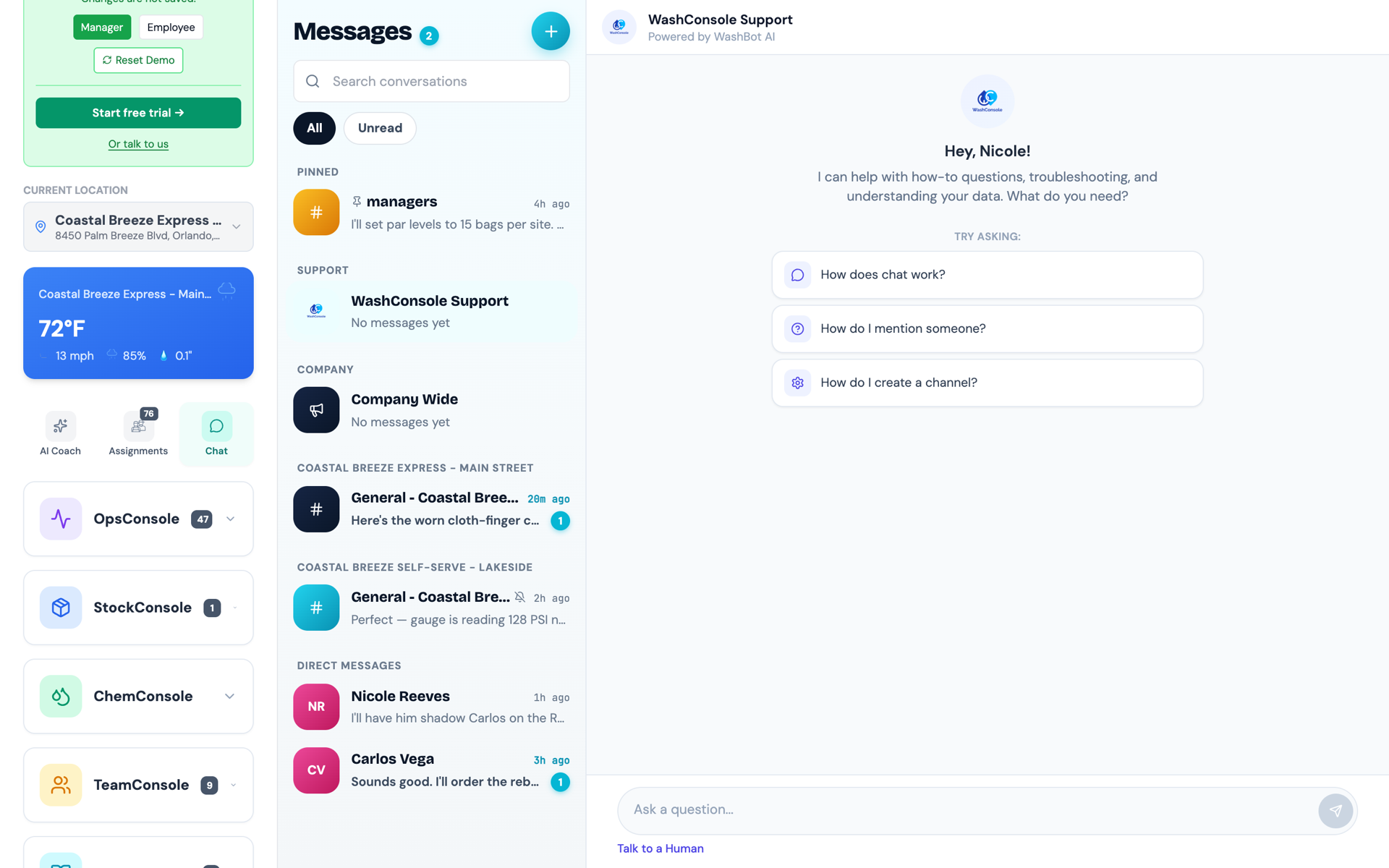
Chat's new Company-Wide channel, marked with a megaphone in its own Company section, sits alongside pinned, support, and per-site channels, with WashBot, the in-app assistant, on the right.

WashBot Now Reads Your Equipment Manuals

WashBot, the in-app assistant, just got a lot more specific. You can now keep a library of OEM equipment manuals and attach the right manual to each machine. When someone asks WashBot how to set, service, or troubleshoot that equipment, it answers from your manual and cites the source, down to the page, instead of guessing from general knowledge.

Manuals that are scans or photos still work: if a manual has no selectable text, WashConsole runs it through text recognition so WashBot can read it too.

Work Orders From the Floor, Plus Maintenance Insights

Two upgrades to keep maintenance moving:
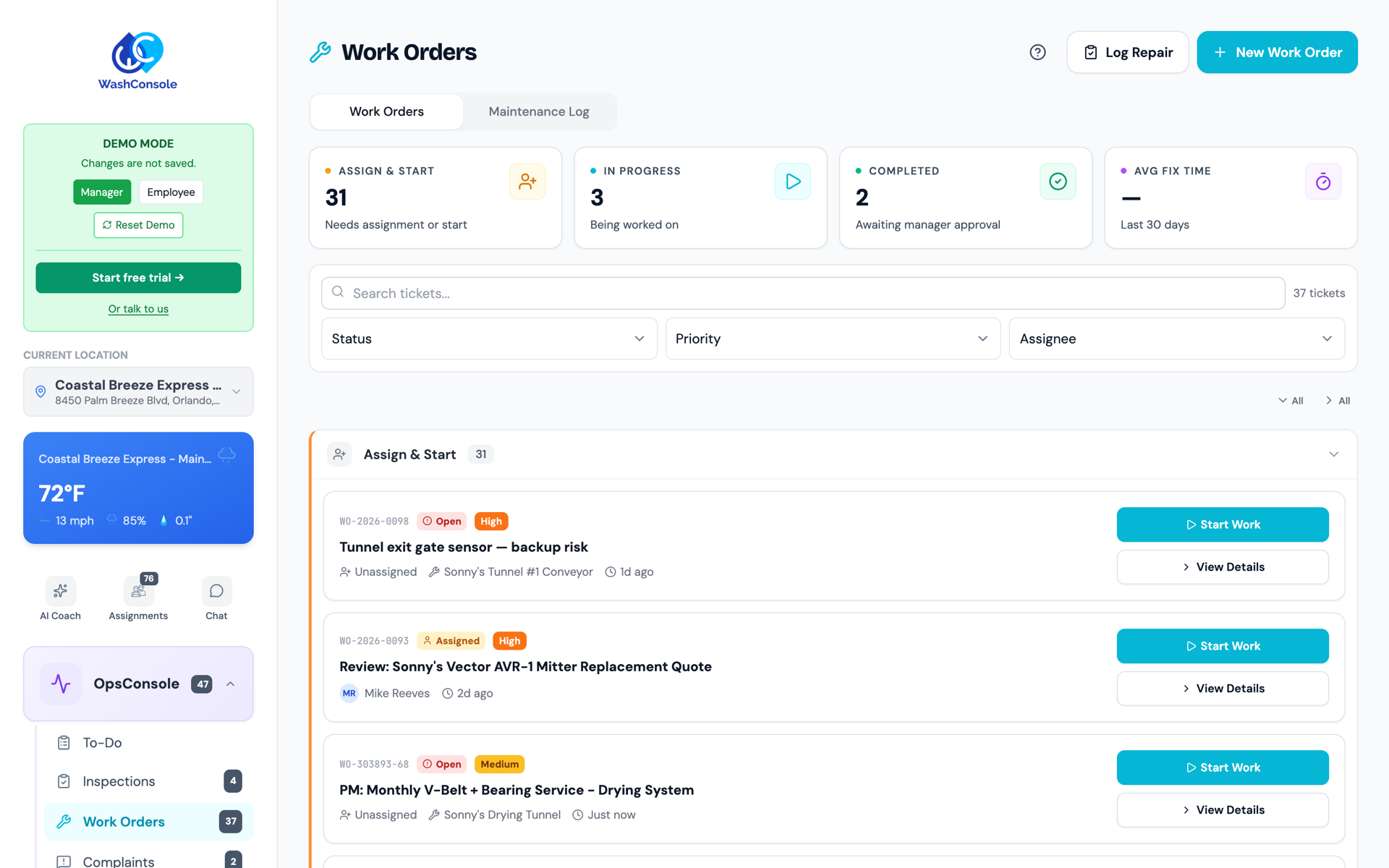
Employees can report work orders. A team member who spots a problem can now create or report a work order themselves, so the issue is captured the moment it's noticed instead of waiting for a manager to be free.
A maintenance summary. Above the Maintenance Log, WashConsole now sums up your completed repairs across sites, grouping scheduled preventive maintenance separately from actual failures so planned upkeep and real breakdowns stay easy to tell apart.
The Work Orders board groups tickets by status (Assign & Start, In Progress, Completed), with a Log Repair shortcut and the Maintenance Log one tab away.

A Sharper Complaints Workflow

Complaints got a redesign, too. Case details, updates, and evidence are now organized so you can see what happened and what's left to do, and an operational snapshot puts your active, resolved, and average-resolution numbers up top, including customer payouts over the period you choose. Complaints now also capture the vehicle's year, let you require the fields your sites actually need, and collect customer part photos in one flow.
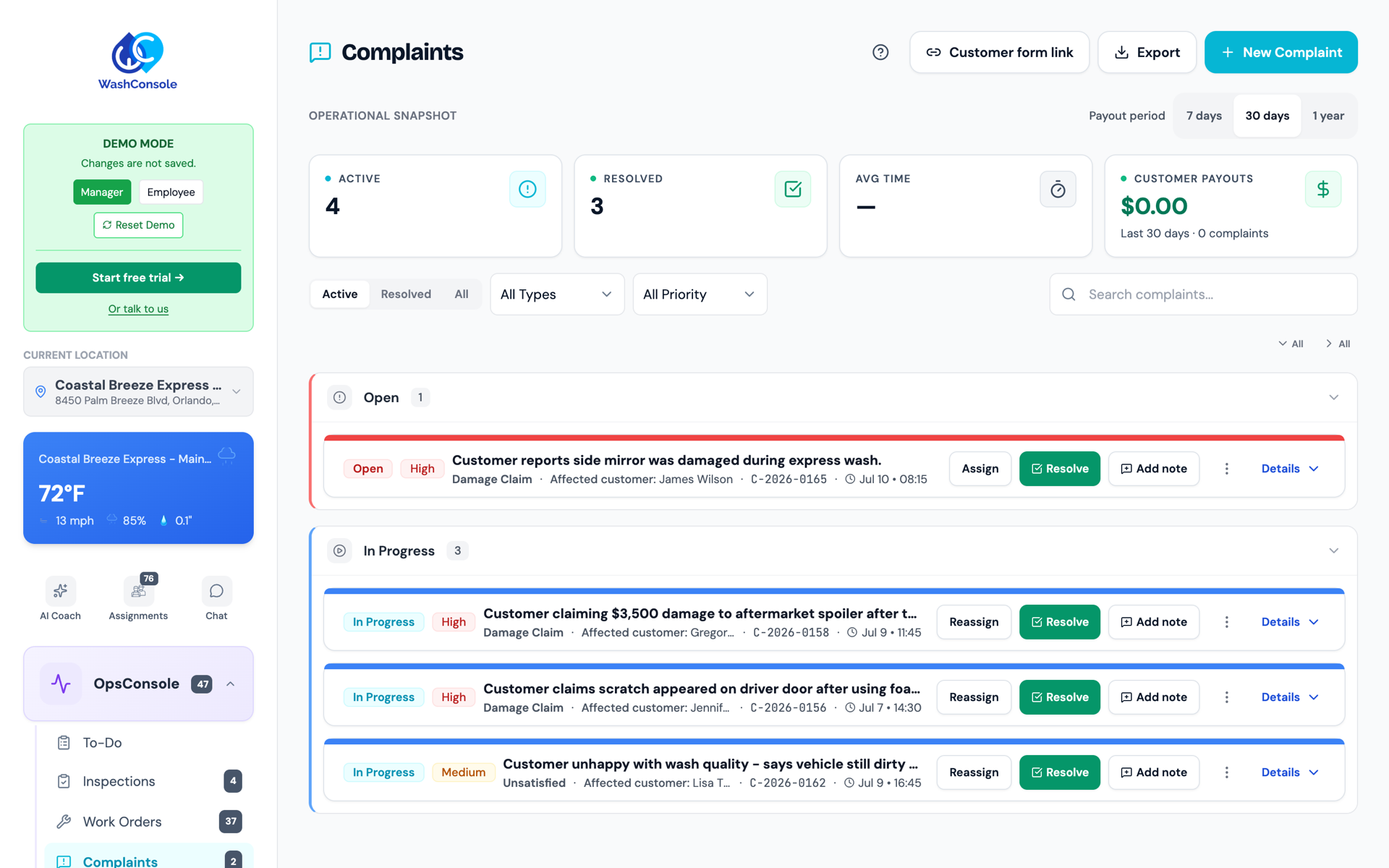
The redesigned Complaints workspace: an operational snapshot with active, resolved, average-time, and customer-payout tiles above damage-claim cases grouped by status.

More Improvements

Hours by Employee, grouped by role. The time-clock hours breakdown now groups people by role, so labor reads the same way your schedule does.
On-site skill checks for every account. Skill checks (quick, in-person verifications that a team member can actually do the task) are now on by default for everyone.
Job Title is its own field. A person's job title is now separate from their account type, so what they're called and what they can access are no longer the same setting.
Take Photo and Upload, everywhere. Every photo field across web and mobile now offers both capturing a fresh photo and choosing an existing one, and you can attach reference photos to zones, locations, and equipment.
A friendlier sign-in. The login screen shows holiday messages on the day, and the Break Room now has a split-flap wisdom board.

Bug & Glitch Fixes

We also spent time tightening the details. A few fixes you might notice:

Your message list tells the truth. A channel whose last message was a photo or a shared card no longer reads "No messages yet." It now shows "📷 Photo" or the card's label instead.
Long shared cards stay in their lane. A work-order or complaint card shared into chat no longer stretches a message bubble off the side of the screen.
Tomorrow isn't "historical." Viewing a future day in To-Do Lists no longer mislabels it as "Viewing Historical Data."
Photos keep their shape. A single shared image now displays at its true aspect ratio instead of being center-cropped into a square.
Chat rides out a bad connection. After a network blip, chat reconnects and recovers on its own instead of quietly going stale.
Kiosk sign-in moves you along. On a shared kiosk, entering your PIN now takes you straight to your signed-in view instead of stranding you on the roster.

Plus dozens of smaller polish fixes across web and mobile, for an experience that feels a little steadier everywhere.

That's the latest. As always, these updates came from real operators telling us what would make their day run smoother, so keep the feedback coming.

Built by Carwash Operators, for Carwash Operators. Learn more at WashConsole.

Chat