Let Customers Submit Complaints From a QR Code No App, No Sign-In
Your customers can scan a QR code at the wash and submit a complaint with photos in under a minute: no app, no sign-in. They get a ticket-number receipt by email, and your team sees everything in the Complaints tab.
The Problem with Paper Complaint Slips
Most car washes handle complaints one of two ways: the customer calls and leaves a voicemail, or they fill out a paper form at the counter. Both create the same headache; the complaint lives on a sticky note, a napkin, or in someone's memory. It never gets tracked, it rarely gets resolved, and the customer never hears back.
We built the Customer Complaint Form to fix that.
How It Works
For Your Customers
Your site gets a unique complaint form URL and a scannable QR code. Print the QR code and display it at the pay station, on receipts, or at the exit tunnel. Customers scan it with their phone camera and land on a clean, mobile-friendly form: no app download, no sign-in required.
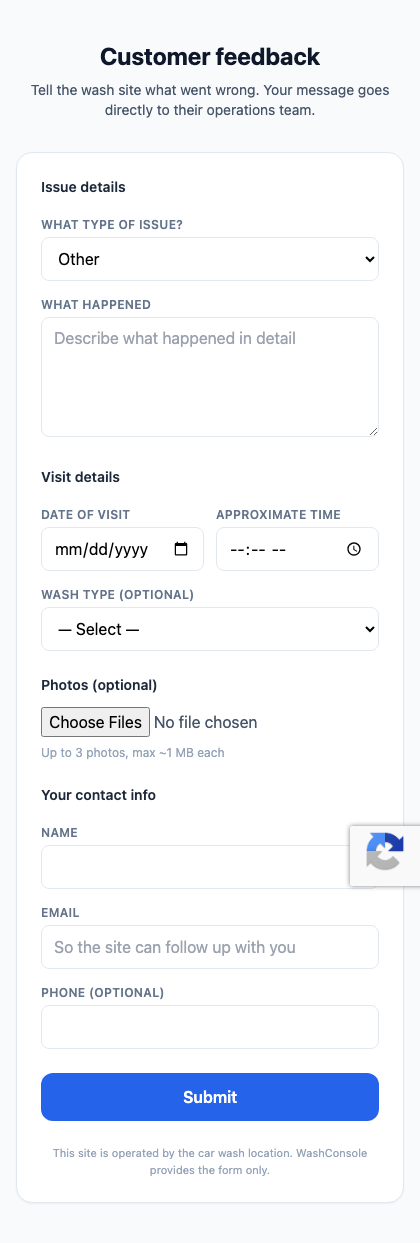
The form asks for:
After submitting, the customer sees a ticket number on screen and receives a confirmation email with that ticket number and a summary of what they submitted, so they know the site team has their complaint.
For Your Team
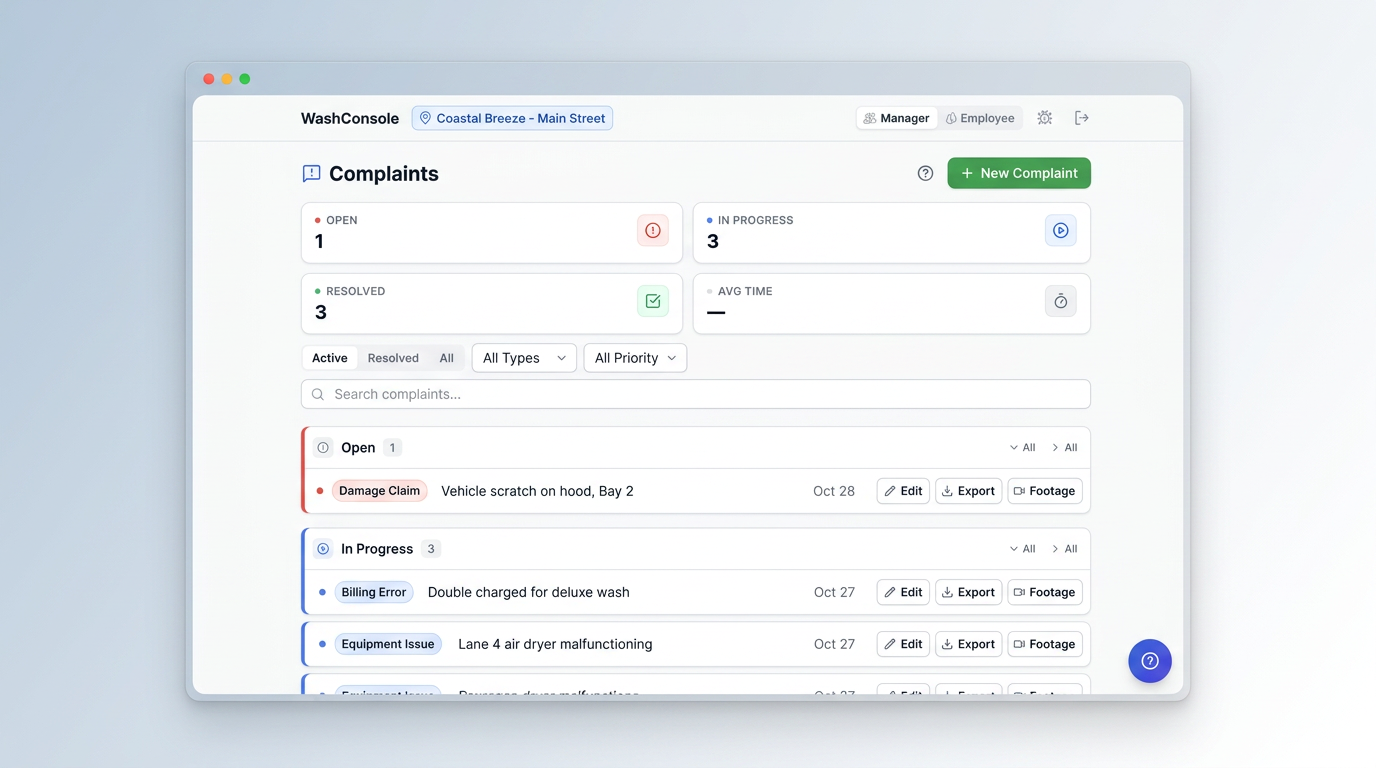
The complaint appears instantly in the Complaints tab inside WashConsole with all the details the customer provided. Contact info, vehicle description, photos, visit time, and a unique ticket number. From there your team can:
The entire lifecycle is tracked: Pending → In Review → Resolved (or Cancelled).
One Receipt, Then You Own the Conversation
If the customer provides an email address, WashConsole sends a confirmation with the ticket number. After resolution, a manager or owner can send an optional email from a separate blank screen. WashConsole does not copy internal notes into it. There is no public status page and no back-and-forth messaging with the customer; complaint records, comments and photos stay inside your operation. If a customer follows up, respond in person, by phone or from your own email, using the ticket number as the reference.
Why This Matters
For the Customer
For Your Operation
For Multi-Site Operators
Each site gets its own complaint form link and QR code. Complaints route to the correct site automatically based on the link the customer scanned. Managers see complaints across all locations from the same dashboard.
Setting It Up
That is it. Customers can start submitting complaints immediately.
Link Security
If a link is ever leaked or shared where it should not be, Managers and Owners can click Rotate link to generate a new URL and QR code. The old link stops working immediately.
Tips for Getting the Most Out of Complaints
Available Now
The Customer Complaint Form is live for all WashConsole subscribers. No extra cost. Navigate to Complaints and click Customer form link to get your QR code.
Built by Carwash Operators, for Carwash Operators. Questions? Visit our [Help Center](/knowledge) or chat with our support team.